On this page
Black Friday 2026 falls on Friday, November 27, with Cyber Monday on November 30. A strong Black Friday email campaign gives each send a distinct job: reward your best customers, announce the offer, answer a buying question, surface a useful category, mark a real deadline, or explain a genuine extension. Before any send, name what changed for the recipient since the previous email: access, the offer, the product selection, service information or a verified deadline. If you cannot name it, skip the send.
Below are 3 real Black Friday emails from Nike, The North Face and Allbirds, 6 templates you can adapt, 18 subject lines, and a send-by-send calendar for November 13 to December 2. After those come the offer math, segmentation, deliverability checks and measurement that decide whether the campaign actually pays.
3 real Black Friday emails worth studying
Nike: early access that is actually early
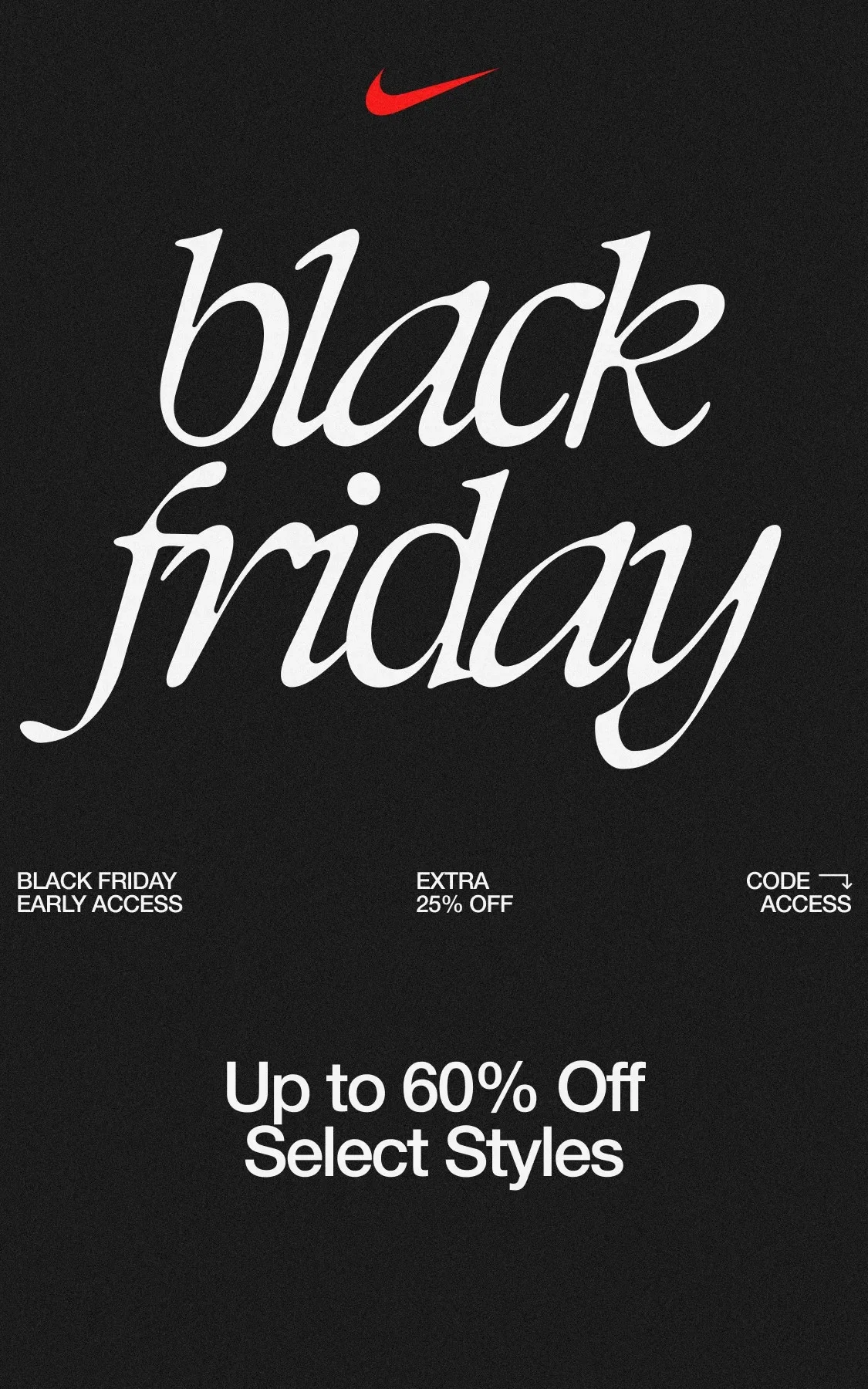
Sent by Nike on November 17, 2024, with the subject "Early Access to Black Friday is here".
Nike's archived message offered up to 60% off selected styles, plus an additional 25% off selected merchandise with a code during a defined early-access window. The email also gave recipients multiple shopping paths such as footwear, featured winter styles and gifts.
What to borrow
Make early access a real window, not a vague VIP label.
Put the offer and the code close enough that shoppers do not need to hunt.
Use category paths to reduce the work of browsing a broad sale.
The catch is complexity. "Up to" offers and stacked discounts ask the shopper to do math, so if your conditions are complex, make the qualifying products obvious on the landing page.
The North Face: urgency attached to a concrete offer
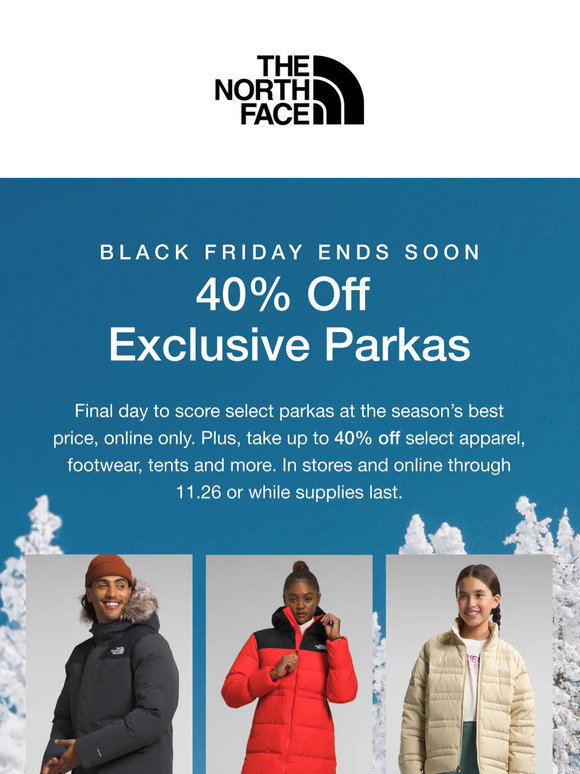
Sent by The North Face on November 26, 2023, with the subject "Up to 40% off Black Friday gear is going fast".
Email Love's archive describes a Black Friday send from The North Face built around large photography, large calls to action and an offer of up to 40% off. The subject combines the promotion with a scarcity cue rather than using a generic "Black Friday is here" announcement.
What to borrow
Let the subject tell the shopper what is happening.
Use visual hierarchy so the promotional message does not compete with dozens of equal CTAs.
Keep the shopping path close to the categories the email features.
Borrow the scarcity cue only if it is true. If inventory is not actually constrained, lean on a deadline, product discovery or service information instead of invented pressure.
Allbirds: an extension that admits it is an extension
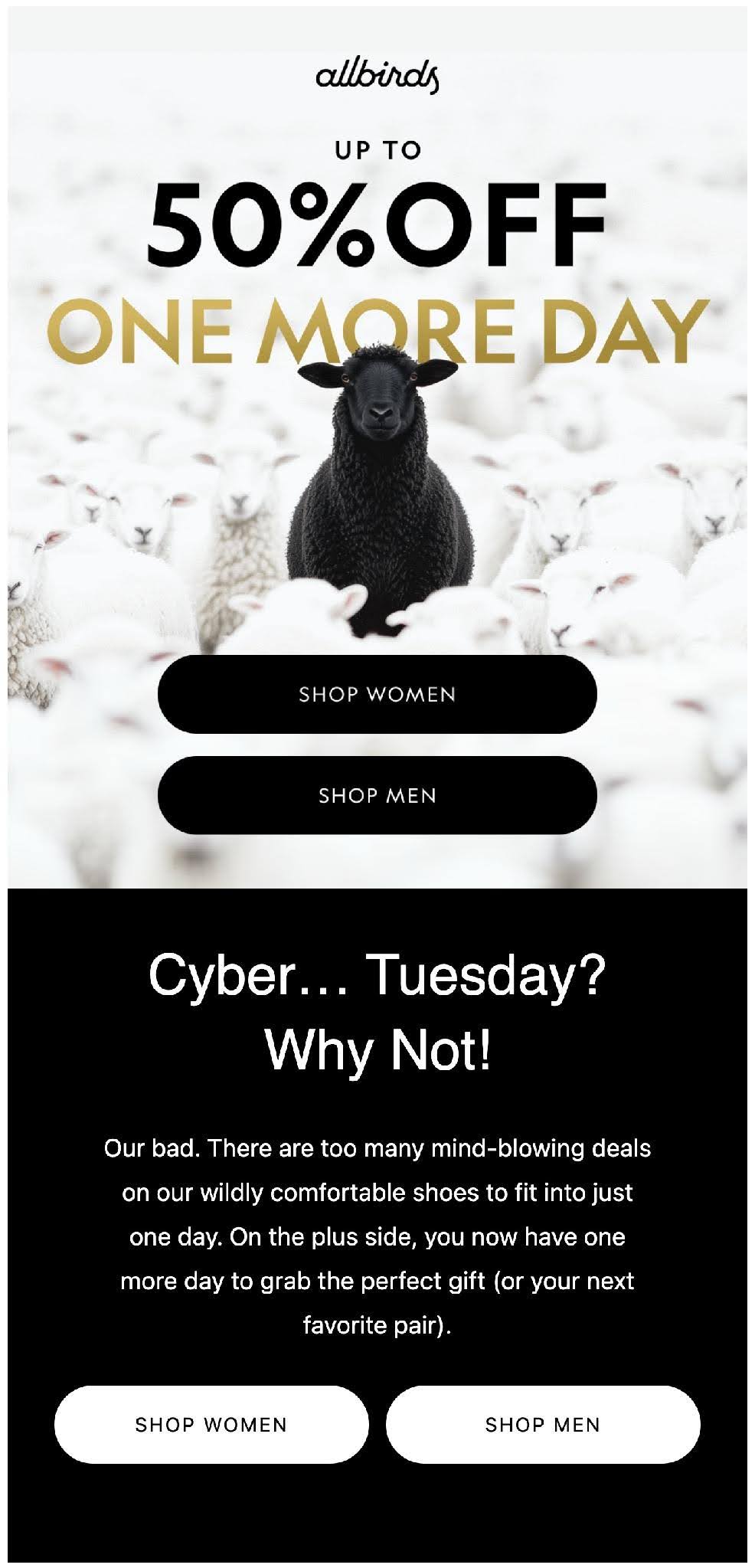
Sent by Allbirds on December 2, 2025, with the subject "This Cyber Monday Deserves An Encore".
Allbirds' archived email explicitly framed the message as one more day after Cyber Monday, offered up to 50% off, and stated a new end time of 11:59 PM PDT on December 2, 2025, subject to conditions and availability.
What to borrow
If the deadline changes, acknowledge the change instead of pretending nothing happened.
State the replacement deadline.
Give a concise reason to act without rewriting the entire launch story.
Use an extension rarely. If shoppers learn that every "last chance" grows another day, your future deadlines stop working.
6 Black Friday email templates to adapt
Pick the template that matches the send on your calendar. Each uses a fictional store, offer and dates so the copy reads as finished; swap in your own store's facts and keep the structure.
Template 1: VIP early access
Subject: Members get early access: 25% off the Winter Edit
Preview: Shop before public access opens Friday at 7 a.m. ET.
Hi there,
As a Northstar Outfitters member, you can shop our Black Friday Winter Edit before public access opens.
Save 25% on selected coats, knitwear, and cold-weather accessories with code EARLY25.
Your early-access window is open now. Public access begins Friday, November 27 at 7 a.m. ET.
SHOP EARLY
Free shipping starts at $75 after discount.
Thanks for being a Northstar member.
Northstar Outfitters
Offer ends Monday, November 30 at 11:59 p.m. ET. Selected styles only. Gift cards and clearance do not qualify.
Template 2: public launch with no code
Subject: Black Friday is live: 20% off at Juniper Home
Preview: No code needed. Sale closes Monday night.
Black Friday is live.
Save 20% across Juniper Home.
Prices are already reduced, so there is no code to enter.
SHOP BLACK FRIDAY
Looking for a place to start?
Bestselling tableware
Gifts under $75
New-season textiles
The sale ends Monday, November 30 at 11:59 p.m. PT.
Juniper Home
Gift cards, clearance and prior purchases are excluded. Free shipping starts at $75 after discount.
Template 3: spend-and-save tiers
Subject: Black Friday: save more as your cart grows
Preview: Save $15 at $100, $30 at $150, or $50 at $225 through Monday.
Field & Finch Black Friday savings are live.
Spend $100, save $15
Spend $150, save $30
Spend $225, save $50The discount updates automatically when your eligible merchandise subtotal reaches each tier.
BUILD YOUR CART
Easy ways to complete the cart:
Restock the Cedar Hand Cream you reorder every month
Pair the Canvas Weekender with its matching toiletry pouch
Add the Beeswax Candle Trio for your holiday host
Tier thresholds use merchandise subtotal after any product-level discounts, before tax and shipping are added. The offer ends Monday, November 30 at 11:59 p.m. ET.
Field & Finch
Customize: Replace the 3 product ideas with products your customers actually buy together, so each one is a useful next item rather than filler.
Template 4: a reminder that says what changed
Subject: 18 new styles just joined our Black Friday sale
Preview: The 25% offer is unchanged; the selection is not.
If you already saw the Morrow Goods Black Friday launch, here is what changed:
Winter boots, cashmere scarves and the Morrow Signature knits are now included in the sale.
Our new Gift Guide pulls the under-$75 picks into one short list, so you do not have to dig through the full catalog.
SEE WHAT'S NEW
The main offer is still 25% off selected styles, ending Monday, November 30 at 11:59 p.m. ET.
Already ordered? Thank you. You can ignore this reminder while we focus on getting your order to you.
Morrow Goods
Template 5: the final deadline
Subject: Ends tonight: 20% off selected winter gear
Preview: Black Friday / Cyber Monday pricing closes before midnight ET.
This is the final day of Cedar Lane's Black Friday / Cyber Monday offer.
Save 20% on selected winter gear.
The promotion closes Monday, November 30 at 11:59 p.m. Eastern time.
SHOP BEFORE IT ENDS
A few things to know before checkout:
No code is needed
Free shipping starts at $75 after discount
Gift cards and clearance are excluded
Questions before ordering? Reply to this email or visit our help page before the deadline.
Cedar Lane
Template 6: an honest extension
Subject: We extended 25% off through Tuesday
Preview: One more day, then promotional pricing closes.
We extended the Harbor & Pine Black Friday / Cyber Monday offer.
New deadline: Tuesday, December 1 at 11:59 p.m. ET.
We are keeping the same 25% discount on selected home goods for one additional day.
SHOP THE EXTENDED SALE
After that deadline, promotional pricing ends.
Harbor & Pine
Selected home goods only. Gift cards, clearance and prior purchases are excluded.
Build the message for the inbox
Whatever the send, the templates above share the same anatomy. When you rewrite them for your store, these are the parts that most often break:
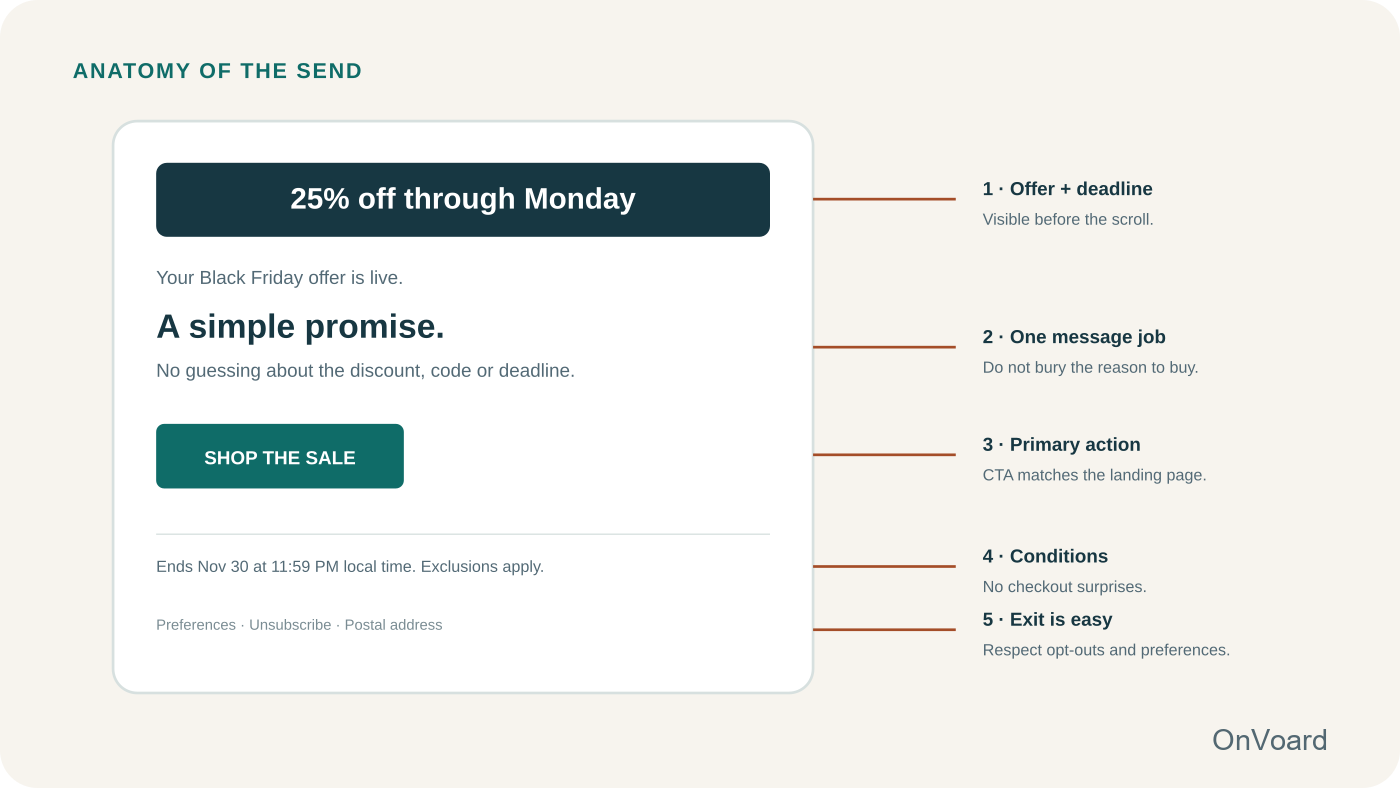
One primary action. Pick the action that matches the email's job: "Shop Black Friday" for a broad launch, "Shop gifts under $50" for a gift send. Category links can sit below the main button when they help finish that same job. A second job gets its own email, not a second primary button.
Conditions next to the claim. If the sale covers selected products, say selected products. State any threshold, and show a required code where the shopper can copy it. Exclusions hidden on a distant terms page turn conversion friction into support tickets.
A deadline the recipient can read. Show the end time with its timezone. For an international list, use a fixed timezone or a localized deadline rather than "ends tonight".
18 Black Friday subject lines with preview text
Describe the event plainly. If there is an early-access window, a specific offer or a genuine deadline, that is already useful information, and it beats a fake "Re:" prefix or an unrelated curiosity gap. Preview text can carry the second-most-important detail instead of repeating the subject.
Once the offer and body are settled, run the final subject and preview pair through OnVoard's Subject Line Tester as a second-pass check. Use your audience data, not only the tool result.
Early access
Subject: Early access: 25% off the Winter Edit starts now
Preview: Members can shop before public access opens Friday at 7 a.m. ET.Subject: You're in early: Black Friday starts today
Preview: Save 20% on selected home goods before the public sale.Subject: Members get first pick on our Black Friday sale
Preview: Your 24-hour early-access window is open.Subject: Black Friday, before everyone else
Preview: Shop selected styles through Thursday before public launch.
Launch
Subject: Black Friday is live: 20% off storewide
Preview: No code needed. Ends Monday night.Subject: 25% off selected winter styles starts now
Preview: Free shipping on orders over $75 after discount.Subject: Black Friday: save on gifts, layers, and cold-weather picks
Preview: Start with bestsellers under $100.Subject: Your Black Friday price is live
Preview: Selected styles are 30% off through Cyber Monday.Subject: Build your cart: save $15, $30, or $50
Preview: The discount increases at $100, $150, and $225.
Useful reminder
Subject: 18 new styles just joined the sale
Preview: The 25% offer is unchanged; the selection is not.Subject: Black Friday gifts under $75
Preview: A shorter path through the sale.Subject: Still deciding? Start with our winter bestsellers
Preview: 25% off selected styles ends Monday.Subject: Before Black Friday ends: shipping + sale details
Preview: What to know before checkout.Subject: Same offer, new gift guide
Preview: See what changed since launch.
Last chance / extension
Subject: Ends tonight: 20% off storewide
Preview: Promotional pricing closes before midnight ET.Subject: Final day: Black Friday / Cyber Monday
Preview: 25% off selected styles ends tonight.Subject: Last call for free shipping + 20% off
Preview: The sale closes in 6 hours.Subject: We extended 25% off through Tuesday
Preview: One more day, then promotional pricing closes.
The 2026 Black Friday email calendar
September is for planning. Use the next several weeks to settle the offer, prepare creative, clean up segment logic, test the landing page and find authentication or list-quality problems before every inbox is crowded.
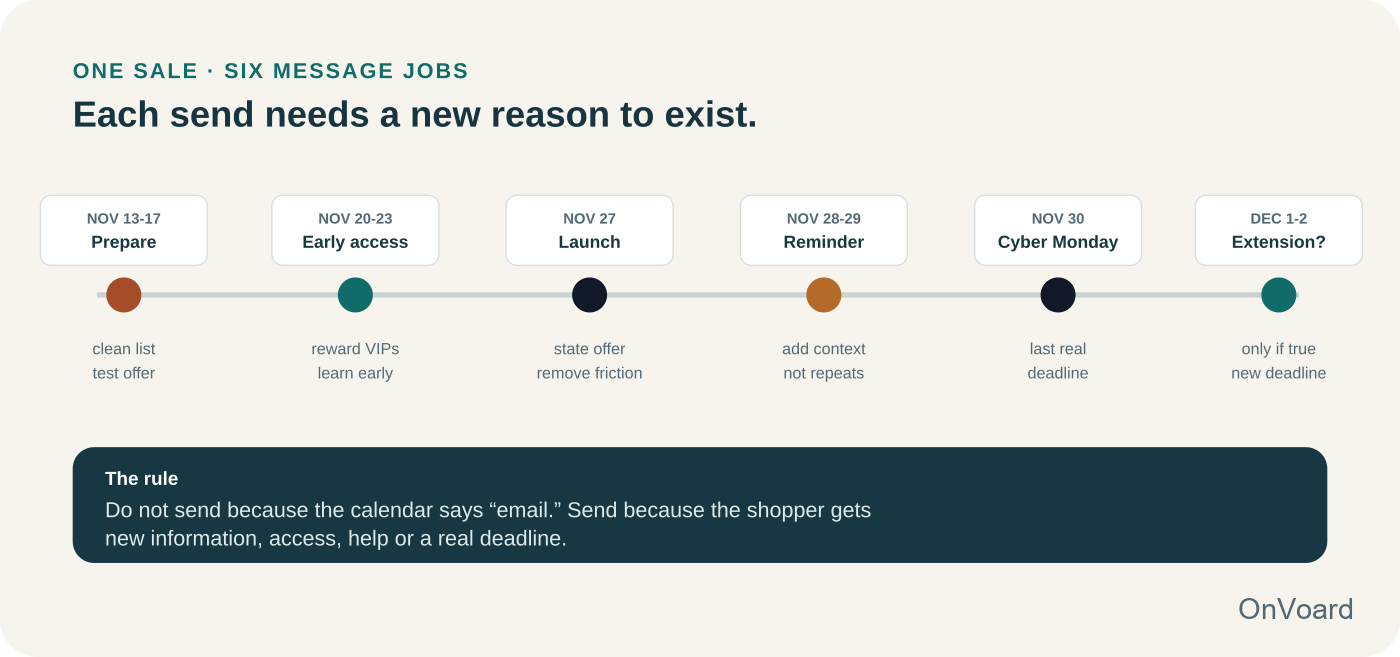
Nov 13-17: Prepare the audience and the promise
Send a pre-event message only when it is useful on its own. Good uses are asking shoppers to save favorites, explaining an unusual offer, inviting loyalty members to confirm preferences, or announcing a real early-access benefit. This is also the time to verify segments, creative fallbacks and links.
Nov 20-23: Early access for a defined segment
Early access works when the recipient receives something meaningful before the public does. Loyal buyers, repeat customers or highly engaged subscribers are obvious candidates. If everyone gets the same link 5 minutes later, "VIP" is decoration rather than a benefit.
Nov 27: Public launch
Make the offer, deadline and destination obvious. Resist the urge to cram every product into the launch email. If the sale is storewide, a strong launch can state the promise, surface 2 or 3 helpful shopping paths, and send people to a landing page built for the event.
Nov 28-29: Reminder with a different job
Use the reminder to surface a recipient-facing change: newly included styles, gift categories, inventory guidance, customer favorites, shipping information, a bundle explanation or a question the first email did not answer.
Nov 30: Cyber Monday / real final deadline
If November 30 is actually the deadline, say so clearly and keep the landing page synchronized. A last-chance email is strongest when it closes uncertainty instead of manufacturing panic.
Dec 1-2: Extension only if the business really extended it
If you extend the sale, name the new end time. Do not train shoppers that every "final" deadline is followed by another final deadline. If there is no real change, stop sending the same promotion and move into post-purchase, fulfillment or holiday-shopping messages.
Timing, spacing and frequency policy
Send when the change is true in the store. Schedule the early-access email for the minute the offer works for that segment, and the launch email only after the public price is live on the landing page.
Pick the hour from your own data. For each time zone with enough engaged contacts, use the hour when last season's campaign clicks peaked there. For a segment without that history, use your account-wide best hour and test it against 1 alternative on a random half of the segment.
Choose a timezone policy. Schedule by recipient-local time when your platform supports it. Otherwise choose one business timezone, state every deadline in that timezone, and explain that recipients elsewhere will receive the final-deadline message at a different local hour. Keep the landing page, displayed deadline and send schedule synchronized to that one policy.
Set a frequency cap from your own data. There is no universal number. Base it on recent complaint, unsubscribe and conversion rates for comparable segments, and decide before the event what result would make you pause the remaining sends.
Cut the least useful reminder first. When a contact reaches the cap, keep the sends that still tell them something new, such as early access, the launch or the final deadline, and drop the generic reminder.
Remove sends with no new recipient-facing change. If no new styles were added, inventory did not move and the deadline did not change, remove that email from the schedule instead of rewriting the launch.
Settle the offer before you write the emails
A weak Black Friday email is usually carrying an offer that was never made clear. The marketer knows there is "25% off," but has not answered the questions a shopper will hit a minute later: 25% off what, compared with which price, in which countries, until what time, can it stack with another code, does free shipping still apply, and will the promoted products arrive when the customer needs them?
We'd start with the offer before touching a subject line. The email should be the shortest path from a precise commercial promise to a landing page that keeps the same promise. If the conditions need a paragraph of legalese before the offer is understandable, simplify the offer or make the exclusions visible earlier.
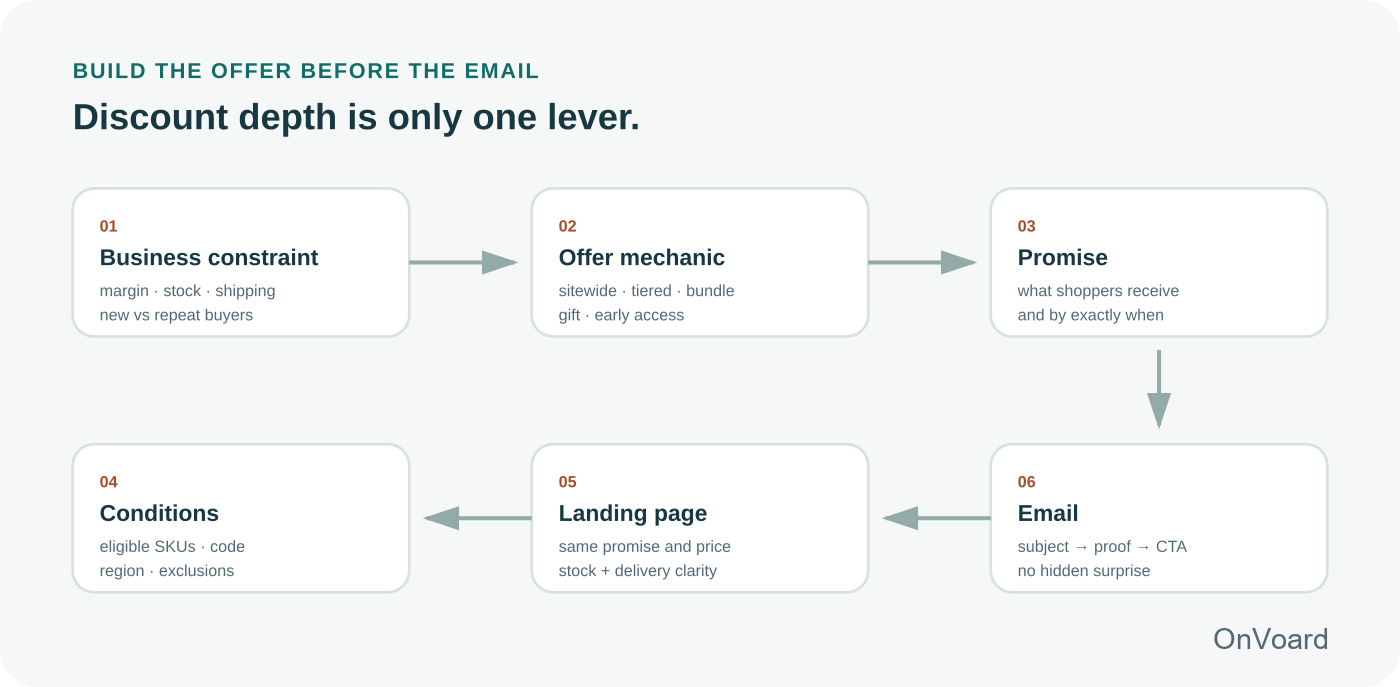
Choose the offer type that fits your constraint
A sitewide percentage is easy to explain, but it is not automatically the best sale. If margin is thin, a bundle, spend threshold, gift with purchase, selected-category offer, loyalty early access or free-shipping threshold can create a stronger reason to buy without discounting every order equally. If you need ideas, use OnVoard's 25 sales promotion examples as the offer-design companion to this guide.
Match the sale structure to the constraint
Constraint | Offer to test | What the email must make obvious | Choose something else when |
|---|---|---|---|
You need a simple event shoppers grasp instantly | Sitewide or selected-store discount | Percentage, eligible scope, code if any, end time | Margin cannot absorb the discount on every order, or most buyers would purchase anyway |
Margin gets painful on small orders | Spend-and-save or threshold gift | Thresholds and what happens at each level | Most orders already clear the first threshold, so the offer discounts orders you would have had |
You need to move specific inventory | Selected collection or bundle | Which products qualify and why they are grouped | The grouped products do not share a buyer, or the collection already sells at full price |
You want loyalty without a deeper public discount | Early access | Who gets access, what is actually early, when public access starts | The early window is not meaningfully earlier than public access, so loyal customers gain nothing |
You do not want to train shoppers to wait for discounts | Gift, bonus, limited bundle or values-led message | Value beyond a lower sticker price | The gift has little value to the buyer, or it costs more to fulfill than a small discount |
Each offer type puts its discount on a different set of orders. A sitewide percentage discounts every order, including the ones that would have happened anyway. A threshold discounts only the orders that reach it, a bundle only the products you grouped, and early access gives up no margin unless it carries its own price cut.
Do the contribution math before increasing the discount
Revenue and contribution can move in opposite directions. A 30% discount may convert more shoppers than 20%, but that does not mean it creates more contribution after cost of goods, shipping subsidy, payment fees, returns and promotional costs. Your Black Friday plan should therefore have a floor: the minimum economics you are willing to accept for each order or segment.
Illustrative contribution per order = net sales − COGS − shipping subsidy − payment fees − expected returns and fulfillment variable cost
Suppose a fictional store sells an item for $100 with $38 in product cost and $8 in variable fulfillment and payment cost. At full price, the simplified contribution is $54. A 25% sale reduces net sales to $75 and simplified contribution to $29 before any extra shipping subsidy. If the sale also offers $7 of free shipping that the store absorbs, contribution falls to $22. That can still be sensible if the promotion creates enough genuinely incremental orders, but now you know what the email has to earn.
Turn the example into a break-even rule
In the fictional example, 100 orders that would have happened at full price earn $5,400 of contribution. At the sale price with the shipping subsidy, the same 100 orders earn $2,200, so the sale gives up $3,200 on orders it did not create. Each sale order earns $22, which means the promotion needs about 146 extra orders for every 100 baseline orders before it beats not running the sale.
The general rule: divide the contribution you give up on baseline orders by the contribution each extra order earns. Set the floor per segment before choosing a discount: the lowest contribution per order you will accept, and the smallest lift in orders that makes the weaker order worthwhile. Run the numbers per segment, because each segment has its own baseline orders, product mix, margin, return rate and response to discounts. A loyal segment that mostly buys anyway needs a large lift to justify a deeper discount, which is why early access or a gift is often the cheaper lever there; a newer segment gives away less on baseline orders, so a sharper offer can clear the floor with a smaller lift only if its margin and returns are similar.
Use your actual product cost, refund rate, tax treatment, shipping economics, discounts and payment fees.
Segment the campaign instead of blasting everyone
Define eligibility before building the send. The same offer can be irrelevant to a loyal buyer, a first-time subscriber, someone who purchased the promoted product yesterday or a contact who has ignored years of email. Use purchase and engagement history only when it changes who should receive the message or what they should see.
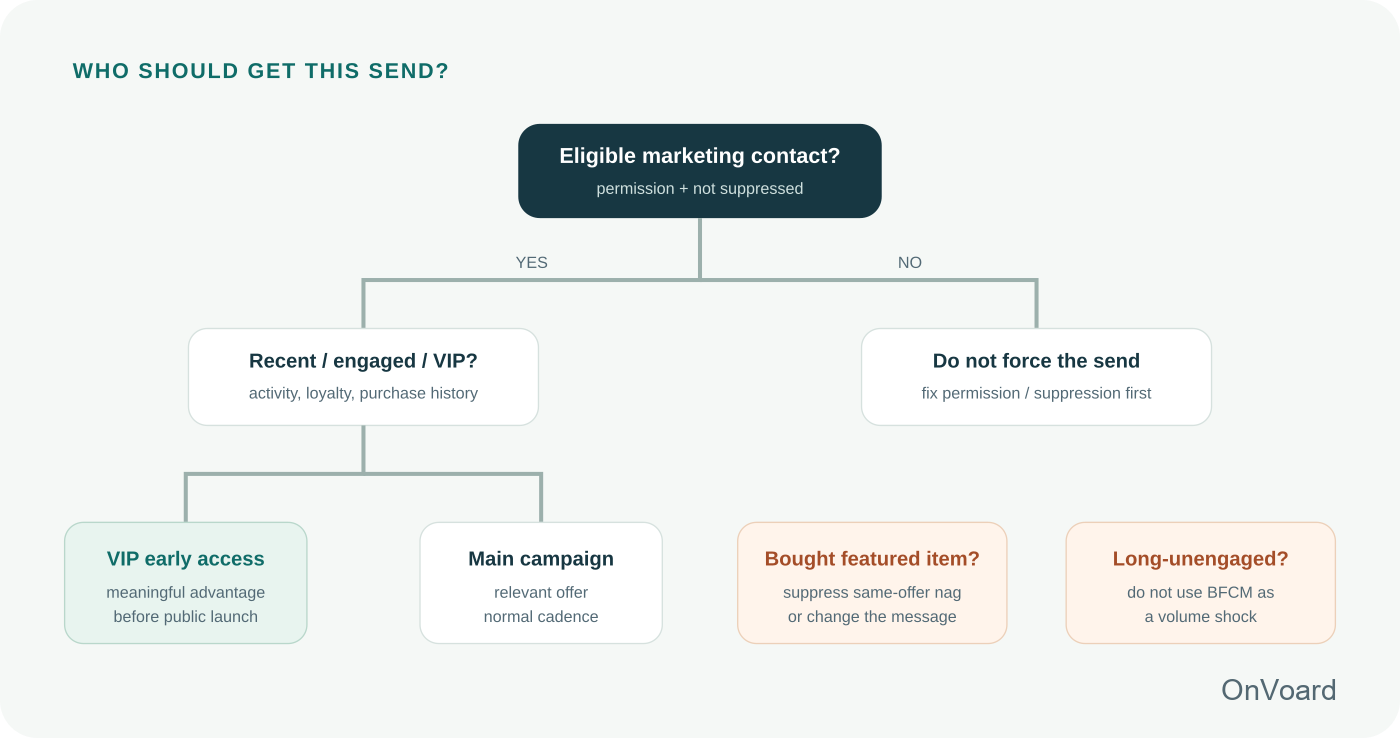
Build a segment only when it changes the offer, timing, product selection or service message. Examples include:
Loyal / repeat customers: meaningful early access or a loyalty-specific benefit.
Recent category browsers or clickers: category-specific paths inside the same promotion.
Recent purchasers: suppress same-product acquisition reminders, or switch to fulfillment, accessories or gifting where appropriate.
High-intent nonbuyers: a late campaign reminder can answer a hesitation or restate the real deadline.
Long-unengaged contacts: do not use Black Friday as an excuse for a sudden, indiscriminate reactivation blast.
When a contact qualifies for more than one segment, apply the rules in this order: consent and unsubscribes, then deliverability exclusions for long-unengaged contacts, then purchase suppressions, then VIP or category variants. The first rule that removes someone wins, so a VIP who ordered yesterday still skips the repeat reminder.
Give VIP early access to a group you can define
"VIP" should map to a rule you can explain: loyalty tier, lifetime value, repeat purchase count, active customer status or another transparent relationship. You do not need to tell shoppers the formula, but your team should know who qualifies and why. Choose the rule from your own purchase history, the early-access inventory you have and the size of group you can actually serve.
Suppress people who already completed the job
If the email's job is "buy from this collection," a customer who bought from it after the sale began does not need 3 more messages asking again. Take them out of that reminder. A recent order can still make someone right for fulfillment, accessory or final-deadline information that tells them something new, so suppress by message, not by customer. Set the lookback from your own order cycle rather than a fixed number of days.
Use engagement as a delivery signal
Long-unengaged contacts carry delivery risk during a high-volume event. Set the engagement window from your own history: look at last season's Black Friday buyers and find how recently most of them had clicked or purchased before the event. Contacts inside that window are the core audience; contacts well outside it stay out of the promotional sequence unless your normal campaigns already reach them. Gmail recommends opt-in practices, periodically confirming subscriptions and considering unsubscribing recipients who do not engage. Google also advises bulk senders to increase volume gradually rather than suddenly sending at much higher volume.
Protect deliverability before Black Friday
Deliverability decides whether the rest of the campaign is seen at all. We'd avoid waking a dormant list just because Black Friday makes the audience look tempting. Receivers use a sender's historical pattern as one signal of legitimacy. A sudden volume spike can resemble a compromised account or spam burst, which is why abrupt sending-pattern changes create risk at the exact moment inboxes are already competitive.
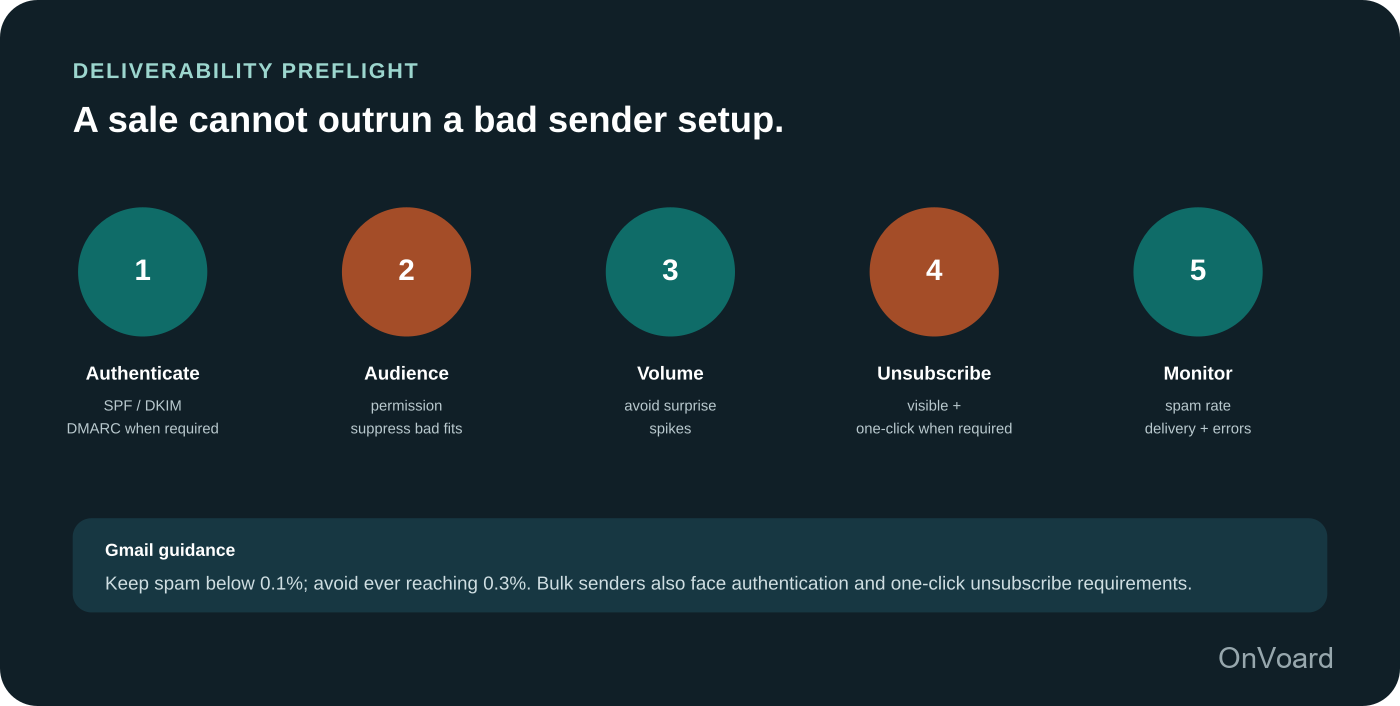
Gmail sender requirements for personal Gmail accounts
Google's Email sender guidelines, in force since February 1, 2024 and checked for this guide in September 2026, set requirements for everyone sending to personal Gmail accounts: SPF or DKIM authentication, valid forward and reverse DNS, a TLS connection, RFC 5322 message formatting and a user-reported spam rate below 0.3%.
Bulk-sender requirements apply at about 5,000 or more messages to personal Gmail accounts within 24 hours. Bulk senders need DMARC, alignment between the From domain and SPF or DKIM, and one-click unsubscribe for marketing and subscription messages alongside a visible unsubscribe link. Google’s Email sender guidelines FAQ says enforcement for non-compliant traffic has been ramping since November 2025 and may result in temporary or permanent rejections. Google recommends fulfilling unsubscribe requests within 48 hours.
Monitor spam rate and enforcement risk
Google's bulk sender FAQ sets the working target: keep the user-reported spam rate below 0.1% and never let it reach 0.3%, because a bulk sender above 0.3% loses eligibility for delivery mitigation until the rate stays under that level for 7 consecutive days. Google also says it does not track opens and cannot verify third-party open-rate reporting, so watch delivery health and complaints first.
Black Friday email preflight
Run this before the first pre-event send, so there is time to fix what it finds. The holiday should not be your first stress test.
Every contact in the send has a valid marketing consent basis for their country, and your unsubscribe and suppression lists are applied. Gmail's sender rules do not replace local email-marketing law such as CAN-SPAM in the U.S., CASL in Canada, or GDPR and PECR in the EU and UK.
SPF and DKIM, and DMARC where required, are configured for the actual sending domain.
The From name, reply-to and authentication identity are the ones recipients expect.
For marketing or subscription mail to personal Gmail accounts, one-click unsubscribe works, and so does the visible unsubscribe link.
Spam rate, bounces and delivery errors have been reviewed.
Every important link lands on a page that shows the same offer, terms and deadline as the email, tested on a real phone.
Mobile, dark-mode tolerance and image-off fallback were checked.
If you plan materially more volume than usual, ramp it through your engaged audience first rather than mailing the whole historical database on November 27.
Build the campaign in OnVoard
Black Friday messages are usually one-time campaign broadcasts, while cart recovery, welcome, post-purchase and other behavior-triggered messages belong in workflows. Keep that distinction because it makes the holiday campaign easier to reason about: broadcasts carry the event; automations respond to what the shopper actually did. OnVoard's Marketing Platform supports broadcasts, contact segments and ecommerce workflows.
Create the event segments first. Define who is eligible for the public campaign, who qualifies for early access and which recent purchasers or suppressed contacts should not receive a repetitive reminder. Use purchase and activity properties only when they change the message.
Build one reusable email structure. Keep the header, offer block, terms and footer fixed across the event, and change only the lead block for each send's job.
Name each broadcast by event and job. A name such as BFCM26 final deadline keeps queued sends easy to tell apart when several are scheduled close together.
Add UTM parameters consistently. Use utm_campaign for the event and utm_content for the job, for example utm_campaign=bfcm26 with utm_content=final-deadline.
Keep recovery workflows coherent. A shopper who clicks the Black Friday broadcast and abandons a cart may still belong in your abandoned-cart flow. Check that the recovery email does not promise a different discount, reference an expired code or keep sending after purchase. The deeper recovery logic belongs in OnVoard's Abandoned Cart Emails: Timing, Templates, and a Practical Recovery Flow.
Measure the business result, not just the inbox
Judge a Black Friday campaign on contribution and incrementality, with clicks and attributed orders as supporting path signals. Privacy features, image loading and mailbox behavior complicate opens, and even a perfectly measured open cannot tell you whether the discount created profitable incremental demand.
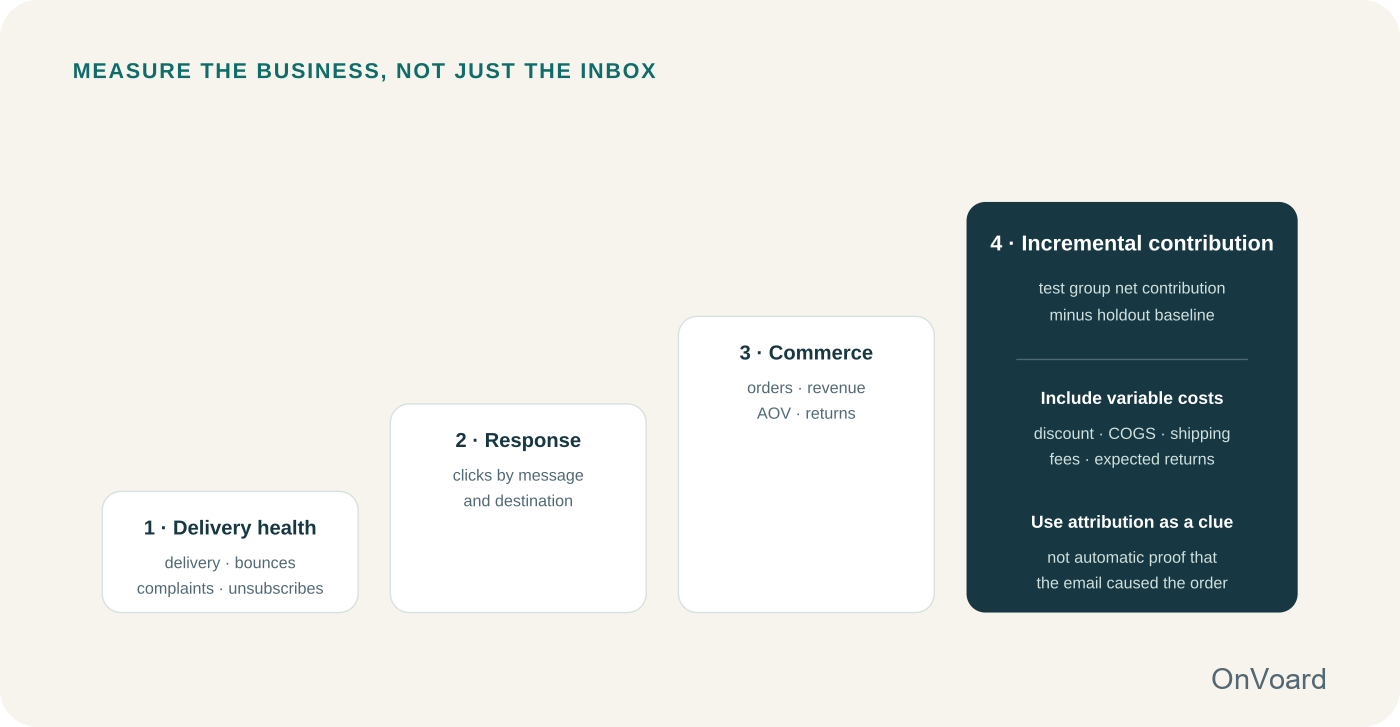
Start with 4 layers
Delivery health: delivered, bounced, complaints, unsubscribes
Response: unique clicks, destination, device and message stage
Commerce: orders, revenue, AOV, refunds and returns where available
Economics: contribution after discount and variable costs
Treat attributed orders as path information
Black Friday demand also comes through direct traffic, paid ads, social posts, word of mouth and shoppers who were going to buy anyway. An attributed order tells you the path; it does not show that the email caused the order. How large that gap is for your store is unknown until you compare eligible recipients with a holdout.
If your audience size and business constraints allow it, reserve a small randomized holdout within a genuinely eligible segment. The holdout still sees the public store experience if the sale is public; it simply does not receive that campaign send. Then compare outcomes at the segment level.
Set up the holdout before you send
Incremental contribution estimate = (test contribution per eligible recipient − holdout contribution per eligible recipient) × eligible audience
Decide the design before the first send, not after the results arrive:
Randomize at the contact level inside one eligible segment, and leave out contacts already in a workflow that sends them the same offer.
Pick one outcome, such as contribution per eligible recipient, and one measurement window, such as the sale period plus 7 days so late buyers count. Use the same window for both groups.
Check what the split can detect. A sample-size calculator for a difference in means, fed with your recent contribution per recipient and how much it varies, gives the smallest difference this holdout can reliably pick up. If that is bigger than a difference that would change your next campaign, the test can only give directional evidence.
Do not send the holdout a substitute email or SMS. Other channels still reach them, and that is the point: you are measuring what the email adds on top.
To compare 2 offers, such as a threshold against a plain percentage, randomly assign eligible recipients to separate offer groups and compare the same outcome. Keep the no-email holdout separate from that comparison.
When the window closes, report the difference with its uncertainty: a 95% confidence interval, or a permutation test that reshuffles which contacts were held out. Contribution per recipient is mostly zeros with a few large orders, so small segments produce wide intervals. If the interval includes zero, the result is inconclusive, not proof that the email did nothing. Do not search through subgroups afterward for one that shows a lift; cut the data enough ways and one will by chance. If the segment is too small to split, compare with a matched period or a previous campaign and label the result directional, because seasonality and offer changes move that comparison too.
A worked example, clearly illustrative
Imagine 20,000 eligible subscribers are randomized 90/10. The 18,000-person test group receives the launch email; 2,000 are held out. Suppose the test group produces $2.80 in net contribution per eligible recipient after the simplified variable costs you chose to include, while the holdout produces $2.35. The observed difference is $0.45 per eligible recipient, which applied to the 20,000-person audience is a $9,000 point estimate. With 2,000 people held out and contribution driven by a few large orders, the interval around that estimate can easily include zero. In that case the honest reading is "promising, not proven," and the next campaign should use a larger holdout.
The discipline is: define the outcome before looking at results, compare comparable people, include discount economics, and separate "the platform attributed this order" from "this send caused this order."
Common Black Friday email problems and what to fix
Revenue is up, but contribution is down
Likely issue: the promotion is buying revenue with too much discount or shipping subsidy.
Fix: compare contribution by offer and segment, not just gross revenue. Test a threshold, bundle, selected-category discount or loyalty benefit before automatically increasing percentage-off.
Clicks are healthy, but orders lag
Likely issue: the shopper meets a specific technical mismatch: sold-out products, code-application errors, confusing exclusions, unexpected shipping calculations or a checkout page that is too broad.
Fix: inspect the landing page and checkout from the email link on a real mobile device. Treat the click as evidence that the email created interest; investigate what happened next.
Spam complaints rise during the event
Likely issue: audience or volume expanded faster than permission and engagement justified.
Fix: stop treating the full historical database as a holiday asset. Review opt-in source, engagement, frequency, authentication and Postmaster signals. Reduce volume before trying to "fix" the subject line.
Your "last chance" is followed by another "last chance"
Likely issue: deadline theater.
Fix: use a final deadline only when it is final. If the business extends the sale, send one extension notice with the new end time and remove any further last-chance sends from the schedule.
Build your campaign in OnVoard or explore the Marketing Platform.