
On this page
A review request is easy to automate and surprisingly easy to mistime.
The bad version fires because an order exists. The useful version waits until the customer can answer a real question about the product, skips orders that should not be asked, points straight at the right review form, and stops once the job is done.
That makes the email only 1 part of the system. The real sequence is eligibility, timing, ask, destination, reminder, then stop. Get those states right and the copy can stay simple. Get them wrong and a polished email still lands while the parcel is in transit, after a refund, or in front of someone who already reviewed the item.
This guide covers 5 observed ecommerce review requests, 8 complete templates, product-specific timing, product versus store-review decisions, photo and video review asks, multi-item orders, repeat buyers, reminder and suppression logic, incentives, awkward-order QA, and the metrics that tell you where the collection flow is actually leaking.
Decide who is eligible before you write the email
Start by defining the order states that make a request reasonable, then choose a send delay that fits the product experience.
We would treat these as the core eligibility checks:
The item has arrived, or your best available signal says it should have arrived.
The customer has had enough time to use the product well enough to form an opinion.
The order was not cancelled, fully refunded, or returned before meaningful use.
For a custom workflow, the customer has not already reviewed the product being selected. Native OnVoard Reviews does not use that product-level check before its initial request.
For a custom workflow, the purchase has not exceeded its written request limit. Native OnVoard Reviews records one request per order.
The customer is not in a state where the request would obviously conflict with an unresolved delivery or replacement problem.
The important distinction is between purchase intent and product experience. Checkout tells you they bought. It does not tell you they can judge fit, durability, flavor, setup, comfort, or results.
If your system has a reliable delivered event, use it. If it does not, build a conservative buffer around the best event you do have. Then make the buffer reflect the product, not 1 universal number.
Full cancellation or a full refund wins: suppress the request and reminder.
An unresolved delivery problem or replacement wins next: pause the custom workflow, then make a new decision after the issue is resolved.
A partial return or partial refund needs a merchant decision by item. Do not claim native item filtering unless the configured workflow has it.
Apply product-use readiness only in a custom workflow that can select the item. Otherwise use the native order-level delay.
Apply prior-review dedupe and SKU cooldown only where the custom workflow implements them. Native OnVoard Reviews records one initial request per order; it checks recent reviews only before a reminder.
Group only items the custom workflow selected. Stop the native reminder after its one per-order limit; do not add later contacts without a separately tested policy.
Before delivery, the customer cannot compare fit, setup, taste, or durability from actual use, so the response is more likely to be a first impression than a useful product review.
A delayed shipment is usually a pause, while a cancelled order is a suppression. A replacement may restart the clock for the replacement item, and a partial return may remove 1 item from the ask while leaving the others eligible.
Customer state | What we would do | Why |
|---|---|---|
Delivered and used long enough | Send | There is a real product experience to review. |
Still in transit | Pause | The customer cannot judge a product they do not have. |
Cancelled before delivery | Suppress | There is no product experience. |
Fully refunded before meaningful use | Suppress | The purchase is no longer a normal review opportunity. |
Replacement in progress | Pause and restart from replacement | The original experience may be about damage or delivery, not the replacement product. |
Already reviewed this item | Stop | The job is done. |
Known support issue | Handle support, then re-evaluate | Do not make a routine automation compete with an active problem. |
Multiple items, some returned | Ask only about kept, review-ready items | A returned item is not current product experience; remaining items may be. |
Repeat purchase of reviewed SKU | Stop | The existing review already answers the product task. |
Repeat purchase, never reviewed | Use a cool-down and ask after deeper use | A later request can be more informative without turning every order into a chase. |
Do not turn that last row into review gating. The FTC's guidance is clear that businesses should not ask only customers they expect to leave positive reviews. A support path can exist beside an honest review path. It cannot become a filter where happy customers are sent to a public review form and unhappy customers are diverted somewhere private.
For multi-item orders, eligibility belongs to the item as much as the order. If 1 product was returned and 2 were kept, the request should not behave as though the whole order has 1 state. That matters later when you decide whether to group the remaining products into 1 email or stagger them.
Choose what kind of review you are actually asking for
A lot of review-request emails get muddled because the merchant has not decided what the customer is reviewing. There are at least 4 different jobs hiding under the word review.
Product review: send the customer to the exact product review form. They can judge fit, quality, taste, setup, durability, use case, result or value.
Order or store experience: send them to a store-level review or feedback form. They can judge delivery, packaging, service, checkout and communication.
Photo or video review: send them to a media-enabled product review form. The media shows how the product looks or works in real use.
Private feedback: send them to a survey or support route, for problems or opinions you want to understand even when they are not a public product review.
Give each job its own email and its own destination. If the subject says 'How is the jacket?' and the button opens a store-rating form about delivery speed, the email has changed the question after the click.
Product and seller feedback can both be useful, but keep them separate. A product review helps the next shopper decide whether to buy the product. A store review helps them decide whether to trust the business. The timing, evidence, and destination are different.
Private feedback is different again. It is fine to ask for it. What is not fine is using private feedback as a gate that decides who gets the public-review link. If a customer can leave a genuine negative review, the system has to be willing to collect it.
For most ecommerce stores, we would make the product review the default post-purchase ask because it compounds on the product page where the next purchase decision happens. Then add store-level or media-rich requests only when they solve a separate job.
This choice also keeps your automation easier to debug. When the destination is fixed, a low completion rate points to timing, friction, or copy. When every message branches to a different review surface, the metric stops telling you what went wrong.
Time the ask to the product, not the order
There is no honest universal best day for a review request. The useful question is simpler: when can this customer say something another shopper would actually want to know?
Product situation | Earliest useful experience | What we would watch |
|---|---|---|
Apparel and footwear | Delivery, a try-on, and ideally a real wear | Returns and exchanges can make an early request awkward. Fit feedback is useful quickly, durability is not. |
Food and simple consumables | Delivery and at least 1 real use | The experience forms quickly, so waiting too long makes the purchase less fresh. |
Skincare and haircare | Enough routine use to judge texture, feel and fit in the routine | Do not push the customer to make outcome claims before there has been a fair use window. |
Supplements | Enough normal use to comment on experience without implying a medical outcome | Keep prompts away from unsupported health claims. |
Home and kitchen goods | Setup plus a few normal uses | Installation problems and damaged deliveries should route to support first. |
Durable or technical products | Setup plus enough use to judge the main job | A first-impression review may miss reliability, compatibility or usability issues. |
Subscriptions and replenishment | After repeat use or a repeat order when the experience is genuinely established | Do not ask after every shipment. Repeated asks become noise. |
Gifts | Evidence the buyer is also the user, or a reason to ask about purchase experience instead | The buyer may not be able to review the product itself. |
This is a product-use clock. Delivery starts it. Actual use gives it meaning.
Fast-to-evaluate products and slow-to-evaluate products should not share the same delay just because they live in the same catalog. A snack, a T-shirt, a mattress, and a skin serum create an opinion on different timelines.
If you sell across very different categories, start with 2 or 3 timing groups instead of 1 delay for the whole store. You do not need perfect predictive timing. You need to stop obviously premature asks.
Then look at the review itself. If customers keep writing 'just arrived, looks good so far,' the email may be early even if the click rate is healthy. If they write detailed use notes but response volume is low, the timing may be fine and the friction may be after the click.
Repeat products create another useful signal. A customer on their 2nd or 3rd replenishment has more experience than someone whose first box arrived yesterday. That does not mean every repeat buyer should be chased for another review. It means repeat-use state can be a better trigger than a generic day count.
5 review-request emails worth studying
Each one handles a different part of the request: the product in view, the question, a mixed basket, the first rating step, and when to ask.
Target: put the exact product next to the action
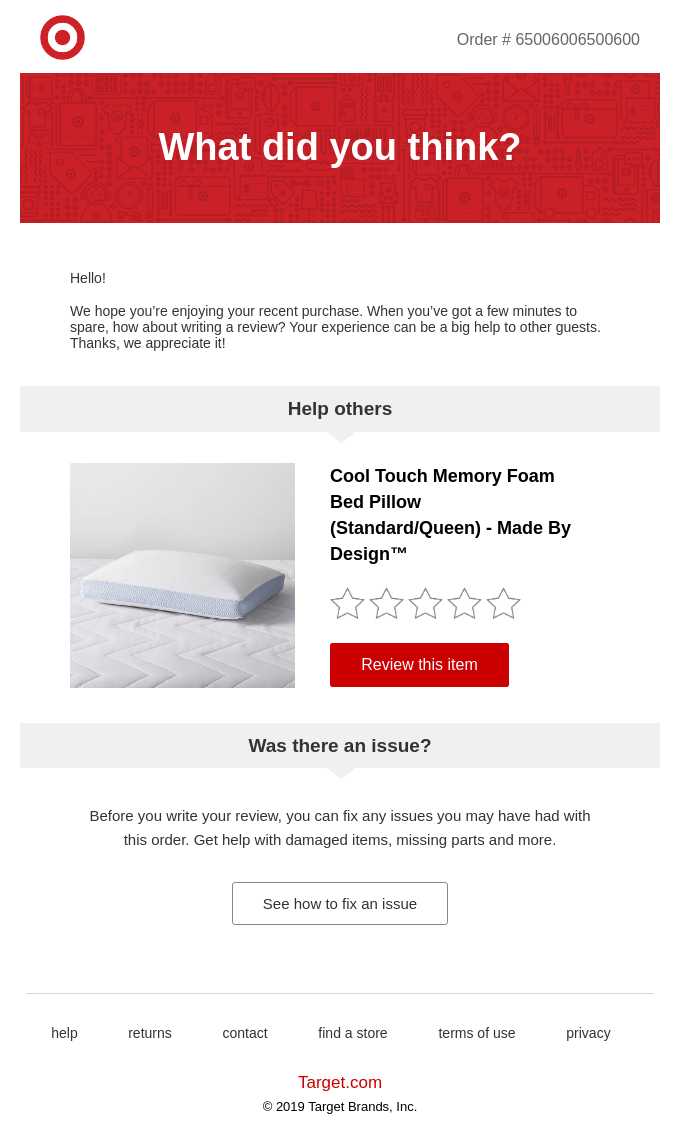
Target's archived email opens with a direct question about the recent order and makes the purchased product the center of the review task. The product context, rating interaction, and review action sit together instead of making the customer remember what they bought.
The email keeps the review action and the order-help route distinct. A store can offer both paths without using the support route to screen review sentiment.
Casper: ask a question the product makes meaningful
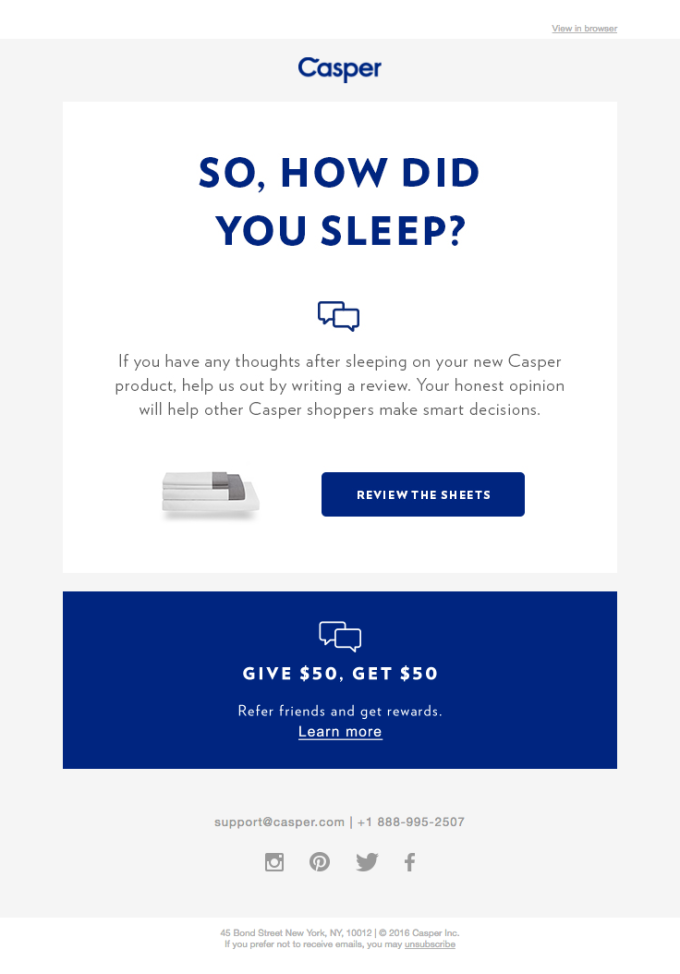
Casper's archived review email asks, 'How did you sleep?' The line works because the product gives the question a concrete meaning. It is a review prompt disguised as a normal product-use question, not a generic satisfaction survey.
The question is specific to the product job: a pillow can ask about sleep, running shoes about the first few runs, and a pan about cooking and cleanup. The question gives the reviewer something to write about without telling them what rating to give.
Chewy: keep a multi-item order inside 1 message
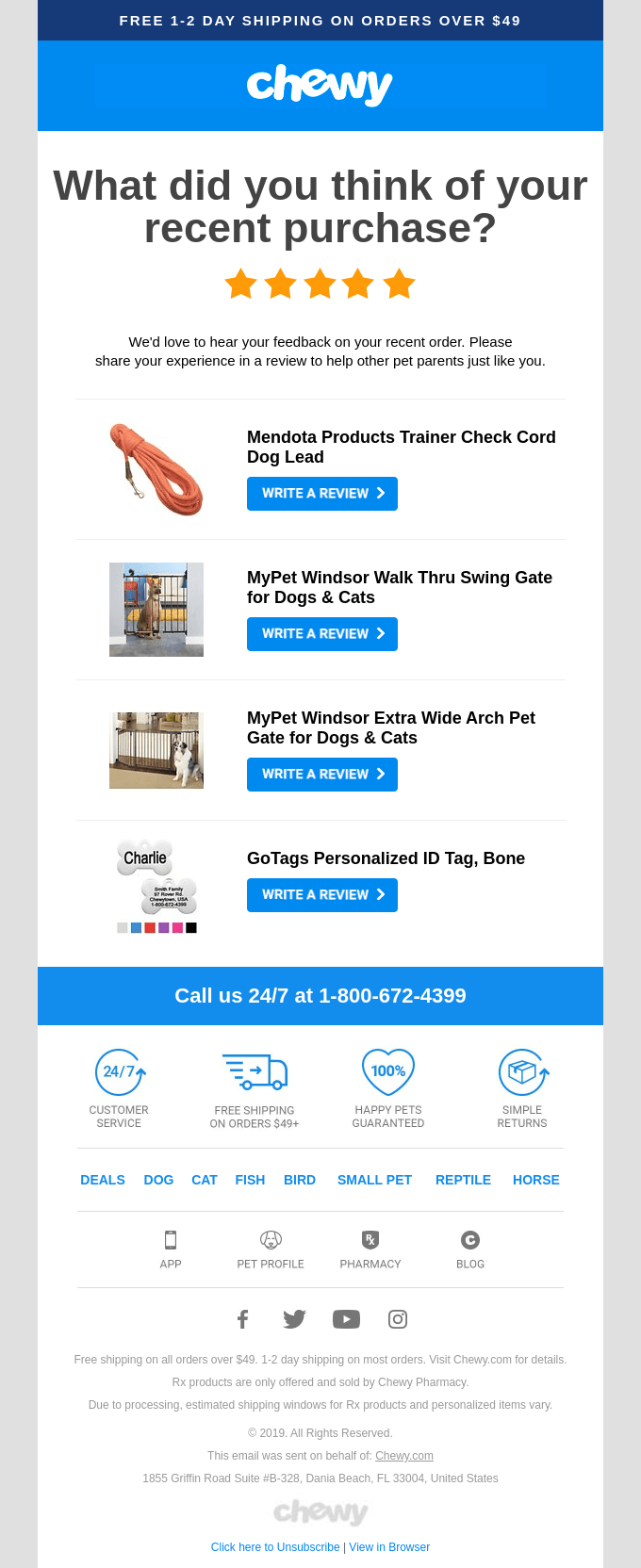
Chewy's archived email asks what the customer thought of the recent purchase and presents individual products with separate review actions. The layout turns a mixed basket into several small, obvious tasks.
A mixed basket can create several asks at once. A workflow with independently selected items can group them into one message while retaining its chosen destinations.
Massdrop: let the rating interaction carry the first step
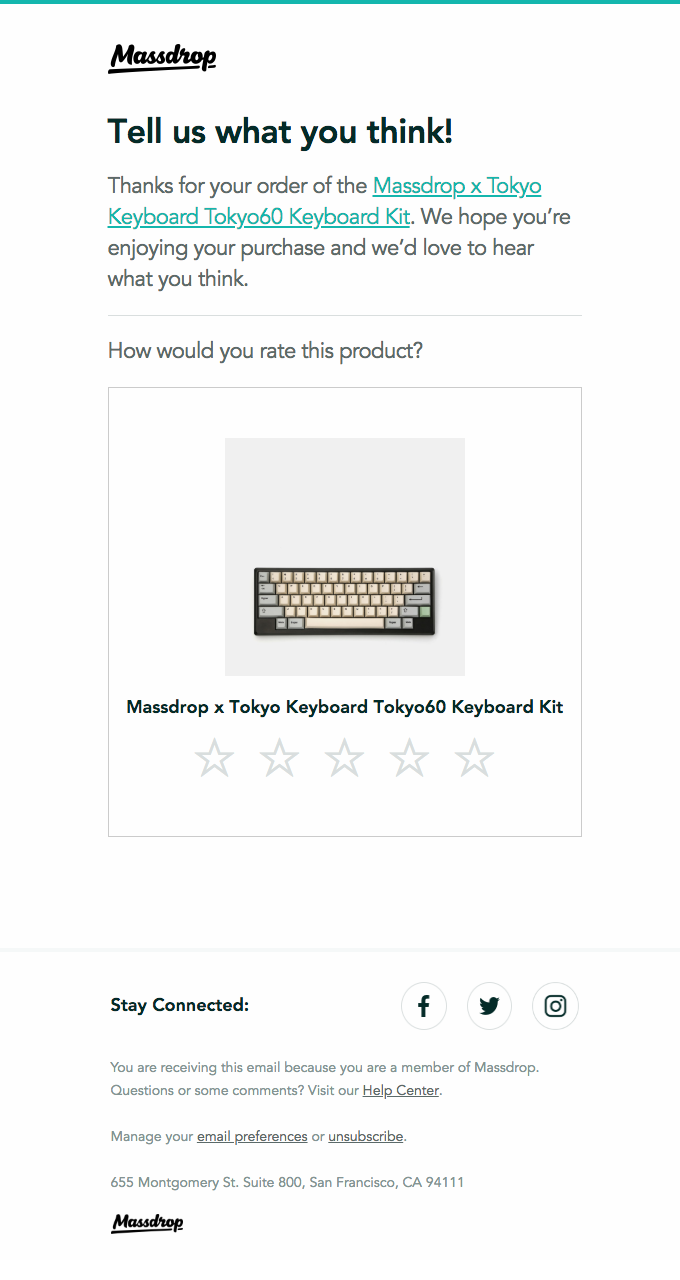
Massdrop's archived Tokyo60 request names the exact product and puts a star-rating interaction directly under the question about how the customer would rate it. The product is not hidden behind a generic 'give feedback' button.
The example shows a low-effort first step. A store can test whether a rating followed by an optional explanation produces the kind of review its shoppers need.
We would not use this as an excuse to collect empty stars forever. The rating is the entry point. Product pages usually become more useful when the customer can add the reason behind it.
Sundays: sometimes the right trigger is much later than delivery
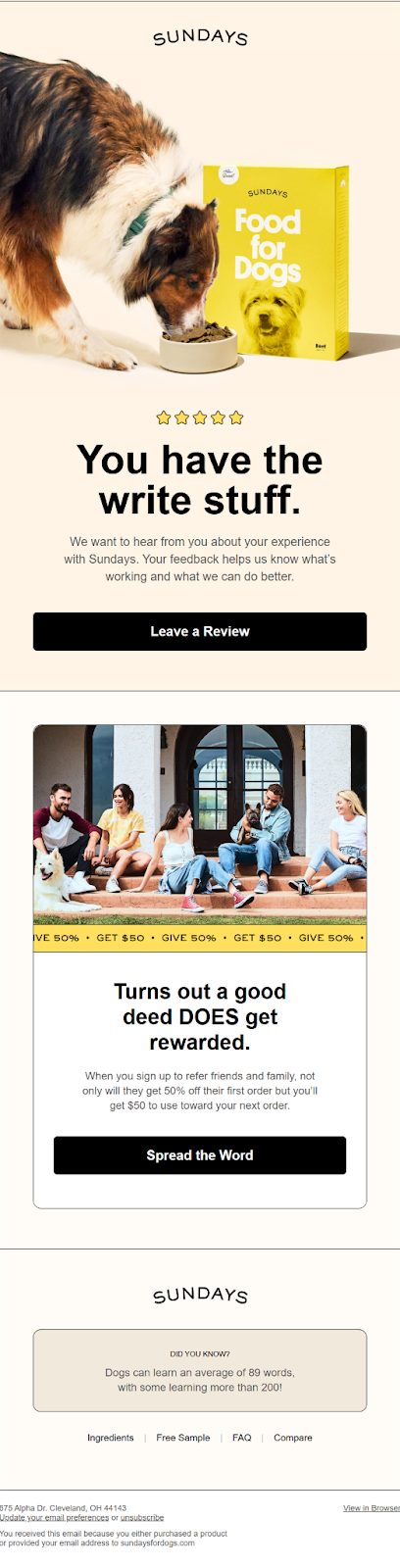
Sundays for Dogs gives us a different kind of example. In a public Really Good Emails interview, the brand's creative director described the review email as living near the end of the post-purchase flow, after customers have moved through onboarding and, in the example discussed, past their 2nd reorder.
That is a useful reminder for products where the experience develops over repeated use. The right moment is not always 'delivery plus 7 days.' A subscription product may earn a stronger review after the customer has used it long enough to reorder.
The danger is over-reading the signal. A repeat purchase suggests continued use, not guaranteed satisfaction. The request still needs neutral language and an honest-review path.
Write the first request around 1 small job
The first request should feel smaller than a marketing campaign because the customer is doing you a favor.
We would keep the structure to 6 parts:
Name the product or purchase so the email has immediate context.
Ask 1 neutral question the customer can answer from experience.
Set the expected effort. A quick rating, a short review, or a photo are not the same ask.
Explain why the review is useful in 1 sentence.
Give 1 obvious path to the exact review form.
Give order problems a support path without steering unhappy customers away from reviewing.
Neutral does not mean sterile. It means the copy does not assume the answer. 'Tell us what you loved' presumes the review will be positive. 'How is the kettle working out?' leaves room for the truth.
Specific prompts beat generic enthusiasm. For apparel, ask about fit and comfort. For cookware, ask about setup, handling, cleanup, and normal use. For skincare, ask about texture, feel, and how it fits the routine. The prompt should help the reviewer remember the experience, not coach the sentiment.
The CTA should describe the next action. 'Write a review' and 'Review the Harbor Shirt' are clearer than 'Share more.' If the review form can open for the exact product, deep-link to it.
Do not make the support route louder than the review route unless there is a known order problem. The clean pattern is parallel: review the product here; if something is wrong with the order, get help here. The dirty pattern is conditional: happy customers review publicly; unhappy customers contact us privately.
Keep the rest out. A review request does not need your origin story, a new collection, 3 social links, a loyalty pitch, and a sale banner competing with the review button. If you want to cross-sell, do it in another message. This email already has a job.
Match the review ask to the effort you need
Every extra field makes the result richer and the ask harder. Decide what evidence is worth the effort.
Ask | Customer effort | What it gives the next shopper | When we would use it |
|---|---|---|---|
Star rating | Very low | Fast directional signal | Good first step when you need broad coverage. |
Rating + short text | Low to medium | The reason behind the rating | Default for most product reviews. |
Structured attributes | Medium | Fit, size, quality or use-case detail that is easy to compare | Useful when shoppers repeatedly ask the same product-specific questions. |
Photo | Medium to high | Real-world scale, fit, color, setup or result context | Strong for apparel, beauty, home, hobby and visual products. |
Video | High | Movement, sound, setup or richer demonstration | Use selectively for products where video genuinely answers a buying question. |
Store or service review | Low to medium | Trust in the business rather than the SKU | Keep separate from the product review destination. |
Do not make the richest possible review the minimum acceptable review. If the customer can give a rating and 2 useful sentences now, do not lose the whole review because the form also demands a photo.
A better approach is progressive. Let the customer complete the core review first. Then ask whether they want to add a photo or video when that media actually helps. OnVoard Reviews supports text, photo, and video collection, so the media ask can live inside the review experience rather than turning the email into a list of requirements.
Structured attributes are especially valuable when the same question appears on every product page. 'Runs small / true to size / runs large' is easier to scan than 200 reviewers each describing fit differently. But do not manufacture a rating dimension just because the form can hold it.
The review request email should signal the minimum effort honestly. 'Got 30 seconds?' is only fair if the destination really can be completed quickly. If the form asks for a rating, title, paragraph, photo, profile nickname, location, and 4 attribute scores, the email has understated the job.
Choose the smallest review-data requirement that materially helps the next shopper. Richer media and attributes are a second layer, not a reason to make the first layer fail.
8 complete review-request email templates
Each template follows the 6-part structure above. Swap in your own merge fields and product names, and change the product question to what your customer can judge from use.
Template 1: apparel after a real try-on
Subject: How did the Harbor Shirt fit?
Preview text: Your honest take can help the next shopper choose.
Hi
[[FIRST_NAME]],You've had a little time with the Harbor Shirt now. How did the fit and fabric work out for you?
A short, honest review helps another shopper decide whether it is right for them.
If something arrived wrong or you need help with the order, reply to this email and we will sort it out.
CTA: Review the Harbor Shirt
Thanks, Mara at Northline Goods
Template 2: skincare after enough routine use
Subject: How is the Daily Barrier Cream working for you?
Preview text: Tell other shoppers what it is actually like to use.
Hi
[[FIRST_NAME]],You've had time to work the Daily Barrier Cream into your routine. We'd love your honest take on the texture, feel, and how it fits into your day.
Your review helps other shoppers decide if it is the right match for them.
Questions about the product? Reply here and our team will help.
CTA: Write your review
Thank you, The Alder Skin team
Template 3: a consumable after the first few uses
Subject: What did you think of the Citrus Oolong?
Preview text: Taste, aroma, strength: tell us what stood out.
Hi
[[FIRST_NAME]],You've had a chance to make a few cups of Citrus Oolong. How did it land for you?
A quick, honest review helps another tea drinker know what to expect before they order.
If there was a problem with the pack or delivery, reply here and we will help.
CTA: Review Citrus Oolong
Cheers, Ari at Common Leaf
Template 4: a home product after setup and normal use
Subject: How is the Cedar Pour-Over Set working out?
Preview text: A quick review helps someone else know what to expect.
Hi
[[FIRST_NAME]],Now that you've had a few brews with the Cedar Pour-Over Set, would you leave an honest review?
Fit, finish, cleanup, daily use: whatever stood out is useful.
If anything arrived damaged or is not working properly, reply here so we can help with the order. You can still leave an honest review.
CTA: Review the pour-over set
Thanks for giving it a proper try, Noah at Fieldhouse Supply
Template 5: a multi-item order without 3 separate emails
Subject: A quick question about your recent order
Preview text: Review any item you have had time to use.
Hi
[[FIRST_NAME]],Your recent order included a few different items. If you've had time to try them, we'd love your honest take.
You do not need to review everything. Pick any product below that you can judge from real use.
CTA 1: Review the Stoneware Mug Set
CTA 2: Review the Linen Tea Towels
CTA 3: Review the Walnut Serving Board
If anything arrived damaged or is not working, reply here and we will help. You can still leave an honest review.
Thanks, The Juniper Supply team
This is a custom per-item pattern. Current native OnVoard Reviews sends one collector link for the order, including up to 5 original-order product IDs. Use separate product buttons only when an independently verified workflow creates and filters them.
Template 6: a repeat subscriber after the experience is established
Subject: You've been using Field Day for a while now
Preview text: Would you share an honest review for the next customer?
Hi
[[FIRST_NAME]],You've had Field Day Granola in a few orders now, so you know it better than most first-time buyers.
If you have a minute, would you leave an honest review about the taste, texture, and how it fits into your routine?
Your review can help someone decide whether to try their first bag.
CTA: Review Field Day Granola
Thank you, The Field Day team
Template 7: ask for a photo after the core review is already done
Subject: Want to add a photo to your review?
Preview text: Show other shoppers how the Ridge Shelf looks in a real home.
Hi
[[FIRST_NAME]],Thanks for reviewing the Ridge Shelf.
If you are happy to add a photo, it can help another shopper judge the size, finish, and how it looks in a real room.
Your original review is already complete. The photo is optional.
CTA: Add a photo
Thanks again, Mina at Foundry Home
Template 8: 1 reminder
Subject: Still have a minute for the Harbor Shirt?
Preview text: No rush. Your honest review would still help.
Hi
[[FIRST_NAME]],We asked about the Harbor Shirt earlier and know inboxes get busy.
If you've had enough time to wear it, we'd still value an honest review. If not, you can ignore this email.
CTA: Review the Harbor Shirt
Thanks, Mara at Northline Goods
Handle multi-item orders and repeat buyers deliberately
The simplest review flow assumes 1 order equals 1 product equals 1 review. Real stores are messier.
2 cases need their own rule. When a repeat purchase is a materially changed product, such as a new formulation or version, treat it as a new review task instead of assuming the old review still describes it. When the order was a gift, ask about the purchase experience unless you know the buyer is also the user.
For a workflow that can select items independently, a grouped message can reduce inbox pressure because the customer experiences 1 inbox. That is merchant guidance, not a promise about every review tool.
Keep a grouped request short, show only items the workflow can actually select, and let the customer stop after 1. Do not present separate product actions unless the configured review tool can generate them.
Repeat buyers need a written merchant policy. Define whether a reviewed SKU, a reformulation, a subscription renewal, or a new order qualifies for another ask before enabling a custom workflow. Native OnVoard Reviews treats each order as a separate request opportunity; it does not apply a SKU cooldown or suppress the initial request because the customer previously reviewed.
Sundays' publicly discussed lifecycle is a good example of using repeat-use state as the signal. The key lesson is not 'wait until order 2' for every subscription. It is that the trigger should match when the product experience becomes worth talking about.
If you have enough volume, this is a good place to segment timing tests by product family or repeat state. Do not segment by predicted happiness. Segment by the amount and type of experience the customer has actually had.
Send 1 reminder, then stop
Silence does not mean the first email failed. The customer may not have seen it, may not have used the product enough, may have intended to come back later, or may simply not want to review.
For current native OnVoard Reviews, a reminder can send only after its initial order request, while the order is not voided, the reminder is enabled, and the contact has not submitted any review in the prior 30 days.
The native reminder stops when the contact has reviewed in the previous 30 days.
A cancelled order or a full refund stops the native request and reminder. A partial refund or return is not an item-level native selector, so decide that merchant policy outside this flow.
A replacement or delivery problem is merchant guidance for a custom workflow. Native Reviews does not restart an item clock.
Native Reviews records at most one reminder for each order. Treat any additional contact rule as a separately tested merchant policy.
The reminder should acknowledge the earlier ask without applying pressure. 'Still have a minute?' is enough. A countdown, fake urgency, or a bigger reward because they ignored you teaches the wrong behavior.
Before adding another reminder outside native Reviews, measure whether the first request or the destination is the weaker step and record the customer-contact cost alongside completed reviews.
The reminder can also diagnose the first send. If it produces most of the reviews, check whether the original request is too early, lands on a poor day in the customer lifecycle, or sends before the review destination is ready.
Do not automatically respond to a strong reminder with reminder 2 and reminder 3. More messages can increase raw submissions while making the customer experience worse. Investigate the timing or destination before expanding the reminder sequence.
Give unhappy customers support without review gating
A review request and a support route can live in the same email. The problem starts when the support route is used to decide who is allowed to review publicly.
Keep the support route available alongside the public review path described earlier. A customer with a negative experience should not be diverted away from that path. FTC guidance warns businesses not to ask only customers they think will leave positive reviews.
Use parallel routes:
The public review action stays available to eligible customers.
The support action is available to anyone with an order or product problem.
A known unresolved issue can pause a routine automation when the timing would be absurd, but resolving the issue does not buy silence.
If the customer already left a negative review, support can still contact them and solve the problem. Do not condition help on changing or deleting the review.
This is also better customer experience. A damaged item is an order problem before it is a marketing problem. Fixing it quickly is useful whether the customer later updates the review, leaves it unchanged, or never reviews at all.
If you want a private product-feedback survey, send it because the survey solves a different research job. Do not use it as a holding pen for customers who gave you a low satisfaction score while the high scorers get pushed to the public review form.
Check that a customer with a negative but truthful experience can still reach the same public review destination.
If you reward reviews, reward honesty
Rewards can increase the reason to act, but they also change the trust problem. Offer any reward for an honest review without conditioning it on positive sentiment.
In the U.S., the FTC's Consumer Reviews and Testimonials Rule says incentives for reviews are not prohibited when they are not expressly or implicitly conditioned on a particular sentiment. The FTC also warns that incentives may need disclosure, and the destination platform can have stricter rules.
That gives you 4 operational checks before you turn on a reward:
The reward is available regardless of rating or sentiment.
The wording does not imply that the review should be positive.
The review can disclose the incentive where required.
The place where the review will appear permits the incentive under its own rules.
Be careful with sweepstakes too. 'Leave any honest review for a chance to win' is still an incentive. It may be cheaper than rewarding every review, but it still changes the reason the review was written and can carry disclosure or platform-policy requirements.
Avoid wording like 'Tell us how much you loved it and get 100 points.' The problem is not the points by themselves. It is that the reward is paired with a requested positive sentiment.
If you operate outside the U.S., treat the FTC section here as U.S.-scoped guidance, not a global rulebook. Check the law and review-platform rules that apply to where you collect and publish the review.
And do not use an incentive to rescue a bad review flow. If the request is too early, the form is painful, or the customer has to hunt for the right product, adding points pays people to tolerate friction instead of removing it.
Keep subject lines plain and separate
A subject line gets an eligible customer to open a request that already deserves to be sent.
We would start with a plain product question: 'How is the kettle working out?', 'Did the jacket fit the way you hoped?', or 'What did you think of your order?'
OnVoard already has a dedicated Review Request Subject Lines page with 32 scored examples. Use it when you need more angles, then run your own line through the Email Subject Line Tester.
Avoid urgency by default. A review request is not a flash sale. If the email needs a countdown and a coupon-sized headline to get attention, the problem may be the ask, not the punctuation.
Set the flow up in OnVoard
In the current OnVoard Reviews flow, configure 1 Review Request delay for the order-triggered request and keep Reminder as a separate follow-up.
The Review Request setting allows 0 to 25 days and sends once per order. Reminder is off by default, allows 5 to 50 days from that same order-log anchor, requires that the request was sent first, and is suppressed when the contact has reviewed within the previous 30 days.
Sending also needs an email profile and a collector. The email is Liquid-templated, and its collector link includes up to 5 product IDs from the original order. That is 1 collector link for the order, not per-item readiness filtering or separate product CTAs.
That configuration range is a tool limit, not a recommendation that every product should be asked on the same day. Use the product-use clock from earlier to choose the delay your store starts with.
If you want the review collection and display layer together, OnVoard Reviews ties submitted reviews to orders for verified-buyer handling and can collect text, photo, and video reviews.
The other 2 automated email types matter after collection. Post-Reviewed can thank the customer after a review is left. Review Replied can notify them when the merchant replies. Those messages are not more review requests, so keep their job separate from the request/reminder cadence.
One important distinction: the Reviews app's request timing is configured as a delay around its order-triggered collection flow. Do not write public copy that promises a carrier-level delivery trigger unless your actual store setup provides that signal.
If your catalog has products with radically different use windows, decide whether 1 order-level Reviews delay is acceptable. Current native Reviews does not choose items by individual readiness, restart an item clock after a replacement, filter a partial return, or give each item a separate review CTA. Use an independently verified workflow only when it supplies those controls. Otherwise choose a conservative order-level delay and make the mixed-basket limitation clear.
Test the awkward orders before launch
Happy-path testing is not enough. The mistakes that annoy customers live in the edges.
Before switching the flow on, create test cases for:
An order that is still in transit when the normal delay expires.
A fully refunded order.
A partially refunded multi-item order.
A returned product while other products in the order were kept.
A replacement order after a damaged delivery.
A multi-item order where only 1 product is ready to review.
A customer who already submitted a review before the reminder.
A repeat buyer who has already reviewed the same product.
A repeat buyer who has never reviewed the product but now has much deeper experience.
A gift order where the buyer may not be the user.
A subscription order that should not create another request.
A customer with an unresolved support ticket.
Then check the destination. The email should open the correct product or collector state, not a homepage that makes the customer hunt for the review form.
Check every merge field with the ugliest real data you have: long product names, variants, missing first names, 1-item orders, 8-item orders, products with no image, and translated storefront names. The perfect demo order is not the one that breaks production.
Finally, test the email with images blocked and on a narrow phone. The product name, ask, CTA, support route, and unsubscribe path still need to make sense.
For media reviews, test the upload path on a real phone. A photo-review strategy that works only on desktop is not a strategy. Check file selection, permissions, upload progress, error recovery, and what happens if the customer closes the page halfway through.
And test stop logic as aggressively as send logic. A request that never sends is visible in your dashboard. A request that should have stopped but keeps sending is visible in the customer's inbox.
Measure the collection system, not just opens
Open rate measures message attention. The collection funnel also needs completion and review-quality measures.
We would read the flow in this order:
Eligible customers. How many orders or products actually reached a review-ready state?
Delivered requests. Did the email reach the customers who were eligible?
Review starts. Did the customer click or begin the rating/review action?
Review completion. How many eligible requests produced a submitted review?
Verified rate. Are the reviews tied back to real orders where your collection system supports verification?
Reminder contribution. How many additional reviews came from the reminder, and did the reminder increase unsubscribes or complaints?
Review usefulness. Are customers leaving enough product detail to help another shopper decide?
Media contribution. When you ask for photos or video, how often do those uploads complete without dragging down the core review rate?
OnVoard's aggregate Reviews email data combines request, reminder, and reply-type messages across merchants. Treat that broad benchmark as context, not as a target for the request stage.
The funnel matters more than the headline number. If delivery is weak, fix sender/list hygiene and suppression. If opens are healthy but review starts are weak, the subject got attention but the ask did not. If starts are healthy but completions are weak, the form or destination is probably the leak.
If completion is healthy but reviews are thin, look at timing and the question you ask. Customers may be responding before they have enough experience to say anything useful.
If reminders do most of the work, revisit the first request's timing before adding another follow-up. The reminder may simply be landing at the first sensible moment.
Compare categories when the product-use clocks are different. A storewide average can hide the fact that food requests are working while skincare requests are early, or that durable products need a longer delay than apparel.
Do not optimize for review volume alone. A flood of 5-star ratings with no detail can look strong in a dashboard and still answer fewer shopper questions than a smaller set of specific reviews about fit, quality, setup, taste, or real use.
Track requests, starts, completions, verified reviews, and usefulness together so the team can locate the weak step.