
On this page
Start with the shopper’s decision, not with the recommendation algorithm. On a product page, help someone choose between alternatives or complete the product they already want. In the cart, remove friction with one useful add-on instead of reopening the whole catalog. In email, use the product or behavior that created the message as context. If a recommendation cannot explain why it belongs at that moment, it is probably just extra inventory on the screen.
That is the useful default for ecommerce product recommendations. A store does not need personalization everywhere. It needs a small set of recommendation jobs that are easy for a shopper to understand, have enough data to work, and can be measured separately.
The logic should change when the decision changes. Similar items can rescue a shopper who likes the category but not the exact product. Frequently bought together can complete a purchase when the relationship is genuinely complementary. Best sellers can orient a first-time visitor who has given you no personal signal. Recently viewed can recover context for a returning shopper. Those are different jobs, even if every block looks like a row of product cards.
This guide uses a decision-first framework and 15 concrete recommendation patterns across product pages, carts, discovery surfaces, email, and popups. The goal is not to install all 15. It is to know which few deserve a place in your store.
Choose the recommendation job before the algorithm

A recommendation earns space when it reduces a real decision. Before choosing a model, write down the verb the shopper needs help with: discover, compare, complete, recover, or continue. That verb tells you more than a vendor’s list of algorithm names.
The same product can be a good recommendation in one state and a bad recommendation in another. A phone case is useful after someone chooses a phone. Another phone may be useful while that person is still comparing models. Put those two recommendations in the wrong order and the store creates hesitation exactly when it should be making the next step easier.
Shopper decision | What the recommendation should do | Useful logic families | Common failure |
|---|---|---|---|
Discover | Give direction before the shopper has expressed much intent | Best selling, trending, top rated, new arrivals, handpicked | Pretending to personalize without enough signal |
Compare | Offer credible substitutes for the product being considered | Similar items, related products, handpicked alternatives | Mixing complements with substitutes |
Complete | Add something that makes the chosen product more useful or complete | Frequently bought together, also bought, handpicked complements | Showing another main product and reopening the decision |
Recover | Restore context the shopper already created | Recently viewed, viewed-category recommendations | Replacing remembered items with generic popular products |
Continue | Use a prior purchase or browse signal to suggest the next sensible product | Also bought, product-based recommendations, recent activity | Repeating what was already purchased or showing an unrelated promotion |
This gives you a simple rejection test: if you cannot explain the shopper decision the recommendation helps with, do not add the recommendation unit yet. The unit may still look attractive, but its job is undefined.
There is also a placement consequence. Discovery logic can tolerate breadth because the shopper has not narrowed the field. Cart logic should usually get narrower because the shopper has already made a decision. Post-purchase logic should respect what was just bought. The closer someone gets to completing an action, the less useful it is to spray the catalog back at them.
Use the strongest data you actually have

Recommendation quality is constrained by evidence. A new store cannot behave as if it has years of co-purchase history. A new product cannot have a meaningful “customers also bought” pattern before enough customers have bought it. This is where many recommendation strategies become needlessly complicated: the store chooses a sophisticated model before checking whether the inputs exist.
Use a fallback ladder. Start with catalog and merchant knowledge when behavior is sparse. Add session behavior once people browse. Add co-purchase logic when order history becomes useful. Add customer-level context only when the channel and consented data support it. A fallback is not a second-rate recommendation. It is what keeps the experience relevant when the preferred model has nothing defensible to say.
Data available | Good starting logic | Why it can work | Do not pretend you know |
|---|---|---|---|
Catalog only | Similar items, new arrivals, handpicked | Product attributes and merchant knowledge exist before orders do | Individual taste or co-purchase patterns |
Catalog + current browsing | Recently viewed, similar items, category popularity | The shopper has created immediate context | Long-term preference |
Meaningful order history | Frequently bought together, also bought, best selling | Purchases can reveal product relationships and demand | That every correlation is a good complement |
Contact history + channel context | Product-based email recommendations, prior-view or prior-purchase follow-up | The message can inherit a real customer context | Intent that the customer never expressed |
OnVoard’s Similar Items logic is a good example of this principle. It uses product text rather than purchase history, so it can provide a fallback for products that do not yet have enough co-purchase data. That does not make it universally better than purchase-based logic. It makes it appropriate when the data state is different.
The operating rule is simple: prefer the most specific logic that has enough truthful input, then define a fallback for the states where it does not. This prevents blank units without manufacturing personalization.
Product page recommendations: help the shopper decide, then complete

The product page carries two different recommendation jobs that are easy to blur. Before commitment, the shopper may need alternatives. After the product feels right, the shopper may need complements. The page should not make both jobs equally loud.
1. Similar items for the shopper who likes the category but not this exact product
Use similar items when the product is close to what the shopper wants but some attribute may be wrong: style, fit, material, feature set, size range, color family, or price band. This is an alternative set. The purpose is to keep the shopper inside the same decision rather than forcing a return to collection navigation.
Place it after the core product information, not above the information needed to judge the current product. A shopper who has not understood the current item does not need five exits. A useful heading is descriptive, such as “Similar trail shoes” or “More linen shirts,” rather than a vague personalization claim.
This pattern is especially valuable for new products because a content-based similarity model can work before the product has purchase history. The fallback can therefore be more stable than a co-purchase block at launch.
2. Frequently bought together for a real complement
Frequently bought together is strongest when the relationship is functional: camera plus memory card, coffee brewer plus filters, planter plus matching saucer, dress plus belt, or refillable dispenser plus refill. The recommendation completes the chosen product rather than competing with it.
The merchandising check matters. Purchase correlation can reveal a relationship, but the store still needs to ask whether the relationship makes sense to a shopper. A high-priced substitute sitting beside an already chosen product can add cognitive cost even when the data connects the items.
Make the add-on easy to evaluate. Show enough information to understand compatibility, variant needs, and price. If an accessory requires a complicated configuration, the recommendation may belong in a dedicated bundle flow rather than a tiny card.
3. Also bought when the relationship is broader than one order
“Customers who bought this also bought” can expose a broader next-product pattern. It is useful when buyers of one product reliably purchase another product, even when those purchases do not always happen in the same basket.
This is a different claim from “frequently bought together.” Keep the label honest. One describes products that appear together; the other can describe what the same customers buy. Treating them as interchangeable weakens the reason the shopper should trust the recommendation.
For a store with thin history, use a fallback rather than forcing the block to appear. A blank space is bad, but an invented relationship is worse.
4. Top rated when reassurance is the missing step
Top-rated recommendations are useful when the shopper wants a safer choice inside a category. They work best as a ranking cue, not as a substitute for explaining the current product. A category page with many unfamiliar products may benefit more than a tightly focused PDP where the shopper already arrived with intent.
Ratings need context. A perfect score from one review should not automatically outrank a slightly lower score backed by a meaningful number of reviews. Ranking methods should account for the reliability of the rating signal rather than sorting only by the visible average.
This is also a place where the reason label matters. “Rated 4.9★” explains why the card is present. “You may also like” does not.
5. Recently viewed as a recovery tool, not a persuasion tactic
Recently viewed is the simplest useful personalization because the shopper created the signal directly. It is not trying to predict taste. It is helping someone get back to products they already inspected.
On a product page, keep the block visually secondary. The shopper is currently evaluating something else, so a recent-history row should function like memory, not a competing hero section. On mobile, that often means placing it lower on the page or behind a compact horizontal list.
This pattern is also a reliable fallback in early-stage stores because it needs browsing history rather than order history.
Cart recommendations: add utility without reopening the purchase

The cart is a commitment surface. The customer has already chosen what to buy, so the recommendation should usually make that choice easier, more complete, or more convenient. A cart is a poor place to restart a broad discovery session.
6. One low-friction complement beside the chosen item
A good cart recommendation answers a practical question the shopper may otherwise discover after checkout. If someone adds a device that requires a cable, a refillable item that needs refills, or a product commonly paired with a small accessory, the cart can surface that relationship.
The strongest candidates are inexpensive relative to the main item, easy to understand, compatible, and quick to add. The cart is not the place for an upsell that requires reading a new comparison table.
Keep the unit small. One strong complement can be more useful than a carousel of eight merely related products because the shopper can understand the reason without abandoning checkout intent.
7. Complete-the-set recommendations when the set is obvious
Fashion, home, beauty, and hobby catalogs often contain products that are designed to work together. A cart can surface the missing piece when the relationship is visually or functionally obvious: pillowcases for the sheet set, an applicator for the product, or a matching component from the same system.
The risk is artificial bundling. “Same collection” is not enough if the second item does not improve the first. Use a handpicked rule when merchant knowledge is stronger than behavior data. Automation should not override obvious merchandising sense.
8. Do not show a substitute after the shopper has already committed
A common cart mistake is to reuse a generic “related products” block. If the algorithm returns another main product, the store asks the shopper to reconsider a decision that was already made. That can be useful in comparison mode and disruptive in checkout mode.
Filter aggressively. Exclude products that compete with the cart’s main item unless replacement is the explicit job. Favor accessories, consumables, services, or low-friction complements. If the catalog cannot produce a useful complement, showing nothing is a valid outcome.
Home and collection recommendations: give direction before personalization

Home and collection pages have a different problem: they often see shoppers before intent is specific. This is where popularity, recency, category context, and merchant curation can outperform overconfident personalization.
9. Best sellers for a first-time visitor
A first-time visitor has given the store almost no personal evidence. Best sellers can provide orientation without pretending otherwise. The block says, in effect, “these are products other customers choose often.” That is a useful shortcut when the catalog is unfamiliar.
Scope matters. Site-wide best sellers can overrepresent one large category. A collection-level best-seller block is often more useful because it respects the part of the catalog the shopper is already exploring.
Use the pattern to reduce choice, not to fill the homepage. A single curated row with clear category context can do the job.
10. Trending for short-term movement
Trending is useful when recent momentum matters more than long-term sales. It can surface products that are gaining attention now without waiting for them to become lifetime best sellers.
Define the window and category logic internally even if you do not print it in the heading. A recommendation called “Trending now” should not quietly be the same list as “Best selling.” The value comes from a different time horizon.
This pattern is especially useful for seasonal catalogs, fast-moving launches, and stores where new demand shifts faster than the historic bestseller list.
11. New arrivals for a shopper who already understands the catalog
New arrivals are not personalized, but they can be highly relevant for repeat visitors who want to see what changed. The recommendation job is freshness, not predicted affinity.
This makes new-arrival blocks a useful homepage or collection module. They can also work in email when the audience expects catalog updates. Avoid mixing old best sellers into the same row just to improve click probability. The label should match what the list actually represents.
12. Handpicked recommendations when merchant knowledge is the signal
Manual curation is underrated. A small store often knows product relationships before an algorithm has enough history to discover them. Staff picks, gift edits, “under $50,” starter kits, and collection-specific picks can be better than a generic model when the selection has a clear editorial reason.
Handpicked does not mean permanent. Treat it as a deliberate rule with an owner and a review date. Remove seasonal edits when the season ends. Replace products that sell out. Check whether a manually curated row still earns its space.
The point is not to avoid automation. It is to use the strongest available signal. Sometimes that signal is the merchant.
Email and popup recommendations: inherit the context that triggered the message

Off-site recommendations become much more useful when they inherit context from the message instead of becoming a generic product grid. An abandoned-browse email already knows what category or product started the interaction. A post-purchase email already knows what was bought. A popup shown immediately after add-to-cart already knows what entered the cart.
13. Product-based recommendations in browse and price-change email
When an email exists because of a specific product event, use that product as the recommendation base. If a shopper viewed a jacket, similar items or related products can help when the original choice was not quite right. If a price-change message is about one product, the recommendation row can stay tied to that same context rather than jumping to site-wide popularity.
This makes the email coherent. The subject, lead content, and recommendations all answer the same shopping problem. A generic “best sellers” footer may still attract clicks, but it weakens the reason the message exists.
Always define a fallback for missing results. New products, sparse history, and unavailable items can make a preferred recommender empty. Catalog similarity or a carefully curated category fallback is better than an unrelated row.
14. Post-purchase recommendations should respect what just happened
After purchase, the next useful product is often a complement, refill, care item, or related category, not the same product again. The timing depends on the product. A replacement part may be useful immediately; a replenishment recommendation may be annoying the day after purchase and useful weeks later.
Use order context and product lifecycle together. The recommendation algorithm can identify relationships, but the workflow determines whether now is the right moment to show them.
This is also where “also bought” can be more informative than same-basket logic. It can expose what customers with the original product tend to buy later, provided there is enough history and the relationship remains sensible.
15. Add-to-cart popups for one immediate complement
Where your storefront and popup setup support an add-to-cart trigger, the popup has very strong context and very little patience. The shopper just chose something. Show one compact complement or a small set of obvious add-ons and make the action easy to understand.
Do not turn this into a second catalog. The popup has to justify interrupting momentum. A compatible accessory, refill, or frequently paired item can do that. A generic trending list usually cannot.
Frequency and eligibility matter too. Do not repeatedly show the same upsell after the shopper closes it or when the recommended item is already in the cart. A technically relevant recommendation can still be a bad interaction if its timing ignores what the shopper just did.
Give every recommendation a reason the shopper can understand
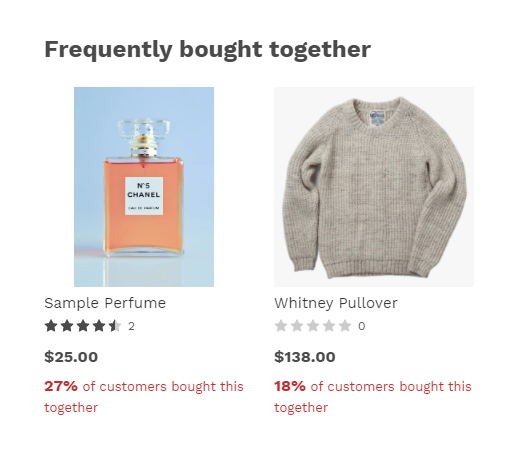
A recommendation card communicates two things: the product and the reason it is here. Most implementations spend all their design effort on the first and hide the second behind a generic heading.
“You may also like” asks the shopper to trust the system. “72% bought this together,” “#1 Best Selling,” “Rated 4.9★,” “Only 3 units left,” or “Last sold 3 hours ago” supplies a concrete reason. The exact wording must be backed by the recommendation logic and current data, but the principle travels across tools: expose the relationship when it helps the shopper evaluate relevance.
The label should answer one of three questions. Is this a relationship to the product I am considering? Is this a ranking inside the category? Is this recent activity that changes how I should interpret the item? If the label cannot answer one of those, it may be decoration.
Reason type | What the label explains | Good use | Avoid |
|---|---|---|---|
Relationship | Why these products belong together | Frequently bought together, also bought, similar items | A relationship label when the logic is only manual popularity |
Ranking | Why this product stands above peers | Best selling, trending, top rated | Ranking claims without a defined source or period |
Recency | What changed recently | Recently sold, recently reviewed, new arrivals | False urgency or stale activity presented as current |
Availability or offer | Why the product is timely | Low stock, real discount | Invented scarcity or promotional text disconnected from data |
Reason labels also make QA easier. If the card says “bought together” but the recommended item is a substitute, the mismatch is obvious. A vague label can hide a bad rule.
Filters are part of the recommendation strategy
Even a good model can produce a bad merchandising result. Filters and eligibility rules turn algorithmic relevance into something a store can actually sell.
Start with availability. A complement that cannot be purchased is not useful. Then apply catalog exclusions: products with tags that should never be recommended, low-quality or low-rating inventory if that matters to the brand, items that conflict with the current product, and anything already in the shopper’s cart when the surface is meant to add something new.
Next, control repetition. If the same product appears as best seller, trending, recently sold, and frequently bought together on one page, the store has four algorithms but one experience. Diversify the job as well as the products. One unit can help compare, another can help complete. Three units that all say “buy this popular thing” are redundant.
Finally, control the fallback chain. A product-based model may return nothing for a new SKU. A cart-based model may have no useful complement. Write the fallback before launch so the empty state is intentional. Similar items, handpicked selections, category best sellers, or no unit at all are all legitimate fallbacks depending on the page.
Exclude unavailable products unless the purchase flow can genuinely fulfil them.
Do not recommend the exact item already chosen when the job is cross-sell.
Keep substitutes out of the cart unless replacement is explicitly intended.
Scope popularity to the relevant category when site-wide popularity would distort the list.
Give new products a catalog-based or handpicked fallback before purchase history exists.
Suppress recommendation units that cannot produce a useful result instead of filling them with unrelated products.
Separate alternatives, complements, popularity, and memory
Many recommendation problems come from treating every product relationship as the same thing. The shopper does not. An alternative answers “what else could I choose?” A complement answers “what would make this purchase more complete?” A popularity list answers “what do other shoppers choose?” A memory list answers “what was I already considering?” Those relationships create different expectations.
Alternatives belong while the shopper is still deciding. They should be comparable enough to replace the current product, which means the card needs attributes that support comparison. If price, size, color, material, or a key feature is the reason to switch, make that difference visible. An alternative that looks nearly identical but costs more with no visible reason creates more work.
Complements belong after the main product has enough momentum. The card should reinforce the decision, not undermine it. Compatibility is more important than variety. If a customer chooses a specific camera body, a compatible lens or memory card can be useful. Another camera body belongs to the comparison stage.
Popularity is useful when individual context is weak. Best-selling and trending lists are not embarrassing fallbacks. They are honest signals. A first-time visitor may benefit more from “popular in this collection” than from a pseudo-personalized list derived from one accidental page view.
Memory is different again. Recently viewed products are not predictions. They are navigation. This is why they can work with little data and why they should be evaluated partly on recovery behavior rather than only on cross-sell revenue.
Relationship | Shopper question | Typical placement | Card information that matters |
|---|---|---|---|
Alternative | What else could satisfy the same need? | Product page, collection | Differentiating attribute, price, availability, rating |
Complement | What completes or improves this choice? | Product page, cart, post-purchase | Compatibility, use together, price, quick add |
Popularity | Where should I start? | Home, collection, broad discovery | Ranking reason, category, recent window when relevant |
Memory | What was I looking at? | Home, PDP lower page, email | Product identity, current price or availability |
Merchant curation | What is worth noticing for this occasion? | Home, collection, campaign | Editorial theme, selection rule, freshness |
A useful recommendation system can have all five relationships, but an individual unit should not try to be all five at once. Clear relationship makes both the copy and the evaluation easier.
Placement changes the cost of a bad recommendation
A weak recommendation is not equally harmful everywhere. On a homepage, a mediocre product row may simply be ignored. In a cart, the same row can interrupt a high-intent checkout. In a narrow mobile popup, it can cover the screen and force an extra close action. Placement therefore changes how conservative the logic should be.
Think in terms of decision distance. Early discovery is far from purchase, so the recommendation can explore. Product comparison is closer, so alternatives should be tighter. Cart is closer again, so the product relationship should be obvious and the interaction low-friction. Post-purchase moves into a new decision cycle where timing and product lifecycle matter more than immediate basket size.
Surface | Decision distance | Safe breadth | Primary risk | Useful default |
|---|---|---|---|---|
Home | Early discovery | Broad | Fake personalization or repetitive popularity | One orientation row such as best sellers, trending, or curated picks |
Collection | Category discovery | Medium | Ignoring category context | Category-scoped popularity, top rated, or new arrivals |
Product page | Active comparison | Narrow | Mixing substitutes and complements | One alternatives job plus one complements job |
Cart | Committed purchase | Very narrow | Reopening the main choice | One low-friction complement |
Depends on trigger | Context-bound | Generic grid disconnected from message | Inherit the product or behavior that triggered the email | |
Popup | Very high interruption cost | Tiny | Turning relevance into annoyance | Only show when the trigger provides strong context |
This is also why “more recommendations” is not automatically a better merchandising strategy. Every unit competes with the product, the page action, and other units. The question is not how many models the engine can run. It is how many distinct decisions the page needs help with.
On a product page, two units can make sense when they have different jobs: one for alternatives and one for complements. Three popularity rows stacked beneath them usually do not add three new decisions. They add repetition.
Three worked merchant situations
Frameworks become useful when they change an actual setup. The following situations show how the same algorithm can be right or wrong depending on the merchant’s data and the shopper’s state.
A new apparel store with little order history
The store has 180 products, two months of traffic, and only a small number of orders. It wants “frequently bought together” on every product page because the label sounds persuasive. The problem is not the idea. It is the evidence. Many products do not yet have enough co-purchase history to produce a stable relationship.
Start the product page with Similar Items as the reliable alternative job because catalog attributes already exist. For complements, use a handpicked set only where the merchant knows the relationship, such as a belt with trousers or a base layer with a jacket. On the homepage, use New Arrivals and category-scoped Best Selling. Add co-purchase logic later as data accumulates, with Similar Items or Handpicked Items as fallback.
The result is less “AI” and more useful. Every surface has something defensible to say on day one, and the store has a clear path to replace manual rules when real behavior becomes available.
A mature home-goods store with strong basket history
This merchant has enough orders to see repeated combinations across bedding, bath, and tableware. Here, purchase-based logic earns more responsibility. Frequently Bought Together can help on product pages when the combination is functional, while Also Bought can surface broader next purchases from customers who bought the same anchor item.
The store should still scope by decision. A shopper viewing a duvet cover may need matching sheets or pillowcases as complements. Someone still browsing duvet covers may need Similar Items instead. The cart should favor the missing matching piece, not another duvet cover. An email sent after delivery can wait until the product lifecycle makes another category relevant.
Measurement should be recommender-specific. If the cart complement receives fewer clicks than the product-page alternatives but converts a higher share of clickers, that is not automatically a problem. The two units serve different moments. Compare each against its own job.
A specialty store with a small catalog
A catalog of 35 carefully chosen products does not need a complicated recommendation engine on every page. The merchant may know the useful relationships better than the data. Handpicked complements, a Top Rated or Best Selling orientation row, and Recently Viewed recovery can cover most needs.
This store should be especially skeptical of repeated units. With only 35 products, several algorithms may keep returning the same five items. The interface then looks personalized while every shopper sees nearly the same catalog subset again and again.
For a small catalog, recommendation quality often comes from restraint: fewer placements, stronger relationships, and aggressive suppression of duplicates. Complexity is not a maturity signal.
Common recommendation failures and what to change
The fastest way to improve a recommendation system is often to remove a mismatch rather than add a new model. These failures are visible without a machine-learning audit.
The recommendation has no visible reason
If the heading says only “Recommended for you” and the products appear arbitrary, the shopper has to reverse-engineer the logic. Change the label or the list. Use a relationship, ranking, recency, or editorial reason that the data can actually support.
The same products appear in every unit
This usually means the page has algorithm variety without decision variety. Best Selling, Trending, Recently Sold, and Top Rated can converge on the same popular products. Remove redundant units, scope them differently, or assign them distinct jobs.
The cart shows another main product
The algorithm may see relevance, but the placement makes the recommendation disruptive. Move substitutes to the comparison stage and reserve the cart for complements or services that do not challenge the main decision.
New products produce empty or strange results
The preferred model depends on history the product does not have. Add a catalog-based or merchant-curated fallback. Do not lower the threshold of a co-purchase model until any weak relationship can appear just to avoid an empty block.
The block optimizes clicks but not purchases
A sensational or loosely related product can attract clicks and still be poor merchandising. Follow the click into converted products and assisted revenue, then inspect whether the recommendation caused shoppers to abandon the original task.
The recommendation is technically relevant but operationally impossible
Out-of-stock products, incompatible variants, unavailable regions, or products already in the cart can make a mathematically relevant result useless. Eligibility filters belong before ranking, not after the shopper sees the card.
These failures point back to the same framework: job, relationship, data, placement, eligibility, reason, measurement. If one of those seven pieces is undefined, improving the algorithm alone rarely fixes the experience.
Treat upsell and cross-sell as outcomes, not recommendation types
Product recommendation, upsell, and cross-sell are related terms, but they describe different layers of the decision. A recommendation is the mechanism that chooses or presents another product. Cross-sell describes a complementary purchase. Upsell describes movement toward a higher-value version or configuration. The same recommendation engine can support either outcome, and it can also support neither.
That distinction prevents a common setup mistake: calling every recommended product an upsell. If a shopper is viewing a $90 backpack and the page shows a $12 rain cover, that is a cross-sell. If the page shows a $130 backpack with a larger capacity and better suspension, that is closer to an upsell or alternative. If the page shows the backpack the shopper looked at yesterday, that is recovery. The card format can be identical while the job is different.
Use upsell logic cautiously near checkout because an upsell can reopen product evaluation. The shopper may need to compare specifications, colors, or sizing again. A cross-sell complement can often be evaluated with much less effort. This is why cart recommendations usually benefit from a lower-friction relationship.
There is also a merchandising implication. A higher-priced alternative is not automatically an upsell worth pushing. It should offer a visible reason to spend more. Without that reason, price alone becomes the recommendation logic, which is rarely persuasive.
Pattern | Relationship | Best moment | What must be obvious |
|---|---|---|---|
Alternative | Substitute | During comparison | Why the shopper might prefer it |
Upsell | Higher-value substitute or configuration | Before commitment, when the benefit is easy to compare | What the extra spend buys |
Cross-sell | Complement | After interest or commitment | How it works with the chosen product |
Recovery | Previously considered item | When context was lost | That the shopper has seen it before |
Discovery | Popular, new, trending, curated | Before specific intent | Why this is a useful place to start |
A recommendation program becomes easier to manage when the team names these jobs correctly. The label, placement, metric, and fallback can then follow the relationship instead of inheriting one generic “recommendation” configuration.
Design the recommendation card around the decision
The algorithm chooses candidates, but the card determines whether a shopper can evaluate them. A good recommendation can fail because the card hides the one detail that makes the relationship useful.
For alternatives, show the attributes that explain the difference. For complements, show compatibility and the friction of adding the item. For ranked products, show the ranking or proof signal. For a recently viewed item, the visual identity and current price may be enough because recognition does most of the work.
Price belongs on most commerce recommendation cards, but price is not always the reason. If the unit is “Top Rated,” make the rating visible. If it is “New Arrivals,” recency should not be buried. If it is “Frequently Bought Together,” the relationship should not disappear behind a generic “Recommended” heading.
Quick add is valuable only when the product can be added safely. A simple accessory with no variant decision can support a direct add action. A product with size, fit, or configuration choices may need a product-detail step. Forcing quick add onto a complicated item trades fewer clicks for more mistakes.
Alternatives: emphasize the differentiating attribute, not just another image.
Complements: emphasize compatibility, price, and a low-friction add action.
Ranked products: expose the ranking reason such as best selling or top rated.
Recency: make the recent relationship legible without inventing urgency.
Manual curation: name the editorial rule so the selection feels intentional.
Mobile: keep the reason and the action close enough that the shopper does not lose the relationship while scrolling.
This is where recommendation strategy becomes interface design. The model may be correct, but the shopper still needs enough evidence to understand the suggestion in a few seconds.
Measure the path from seen to bought, not clicks alone
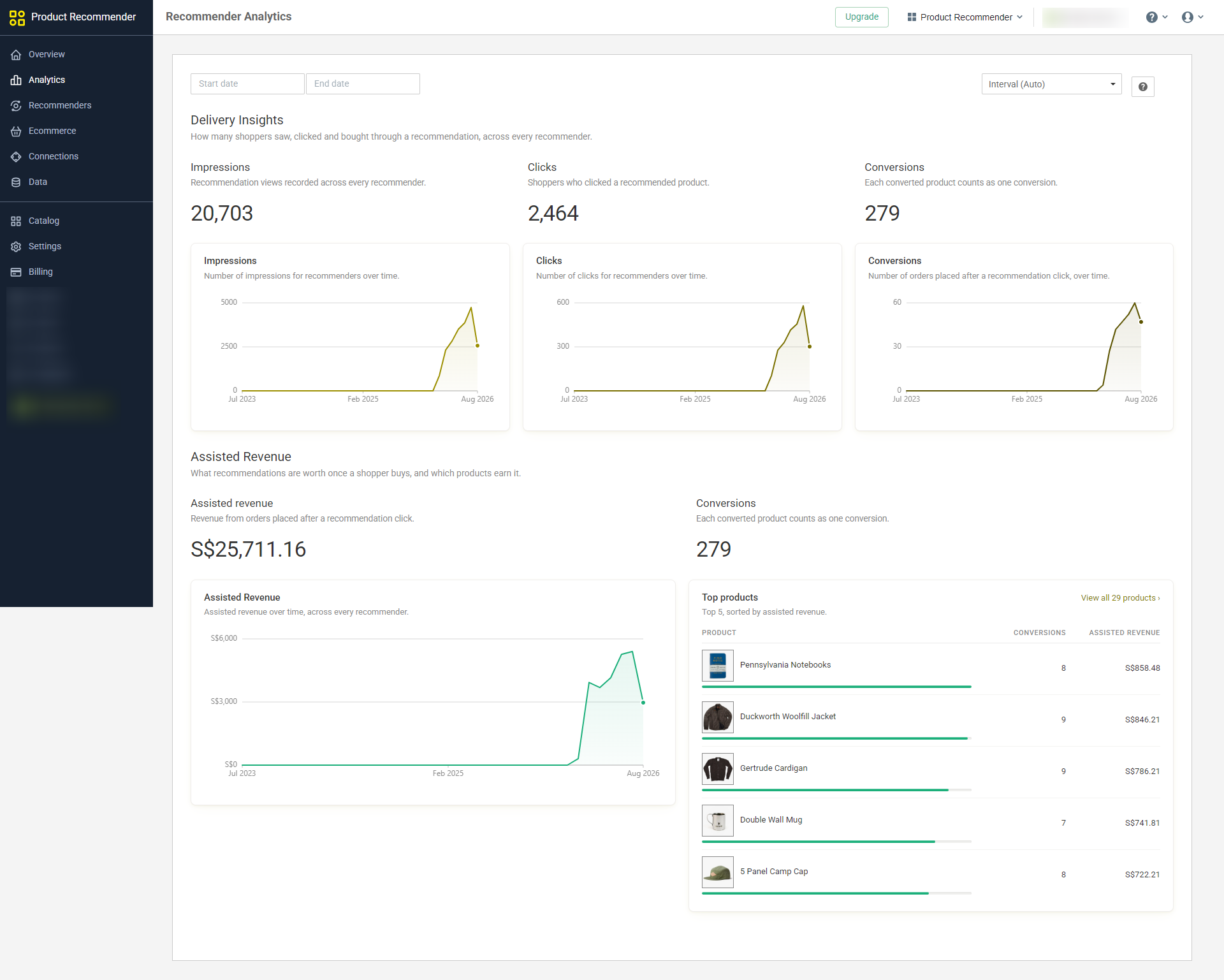
A recommendation click is an intermediate event. It tells you the product caught attention. It does not tell you whether the recommendation helped produce a purchase, whether the purchase was incremental, or whether the unit simply moved a shopper to something they would have found anyway.
The first useful measurement model is a funnel: recommendation impressions, recommendation clicks, converted products, and assisted revenue. Read those stages together. A high click rate with a weak purchase rate can signal curiosity without fit. A strong purchase rate on very few clicks can mean a relevant unit with poor visibility. High assisted revenue can come from expensive products even when unit conversion is modest.
Signal | What it tells you | What it does not prove |
|---|---|---|
Impressions | How often the recommendation had a chance to be seen | That the shopper noticed it |
Clicks | The card attracted enough interest to inspect | That the recommendation caused a purchase |
Converted products | A recommended product was later purchased under the attribution rules | That every purchase was incremental |
Assisted revenue | Revenue associated with converted recommendation journeys | Causal lift versus a no-recommendation control |
Measure each recommender separately. A cart complement and a homepage best-seller row solve different problems, so blending them into one account-wide click rate hides the decision you need to make. Compare like with like: same placement, same job, similar traffic, and a meaningful time window.
When traffic allows, test the recommendation unit against a control or an alternative logic. The stronger question is not “did recommendations generate revenue?” but “did this placement and logic improve the shopper journey enough to justify the space?”
OnVoard’s Product Recommender analytics follows this path from impressions through clicks to converted products and assisted revenue. The word assisted matters. It describes an attributable journey, not proof that the recommender caused every dollar.
Build a minimum useful recommendation system first
A store can cover most recommendation jobs with a small system. Start with a few high-confidence placements and make each one easy to explain. Expansion should come from a missing shopper job or a measured opportunity, not from the existence of another algorithm in the menu.
On product pages, create an alternative recommender such as Similar Items for shoppers who are still comparing.
Add one complement recommender such as Frequently Bought Together or a handpicked accessory set where the relationship is genuinely useful.
Give purchase-history models a fallback for new and low-volume products, and suppress the unit when no eligible result is useful.
In the cart, show only low-friction complements and exclude competing main products.
On the home page or broad collections, use Best Selling, Trending, Top Rated, New Arrivals, or Handpicked Items to provide orientation before personal context exists.
In email, inherit the product, browse, cart, or purchase context that caused the message before falling back to generic popularity.
In popups, use recommendations only when the trigger creates strong context. An add-to-cart trigger can provide that context where your storefront setup supports it.
Add truthful reason labels where the logic can support them.
Apply stock, rating, tag, duplication, and category rules before judging the algorithm.
Review impressions, clicks, converted products, and assisted revenue by recommender, then remove or change units that do not justify their space.
This sequence deliberately leaves some sophistication unused. That is a feature. A compact recommendation system is easier to debug, easier to measure, and less likely to overwhelm a shopper with repeated product rows.
Map the strategy into OnVoard without changing the reader job
OnVoard’s Product Recommender currently exposes 14 recommendation logics, including Frequently Bought Together, Also Bought, Similar Items, Recently Viewed, Handpicked Items, Best Selling, Trending, Selling Fast, Selling Out Soon, New Arrivals, Discounted Items, Top Rated, Recently Sold, and Recently Reviewed. The list is broad enough to cover discovery, comparison, completion, recovery, and continuation, but the same rule applies: choose the shopper job first.
The recommender can render on storefront surfaces including home, product, collection, cart, and other pages, and it can feed recommendations into OnVoard email and ActionPop. If you are implementing this framework, the Product Recommender help center is the useful reference: it groups setup, fallback recommenders, filtering, conversion tracking, and the individual recommendation-logic guides in one place. The Product Recommender page is the product overview if you want to see how those capabilities fit together.
Meta labels can expose the reason behind a recommendation, including relationship, ranking, recent activity, inventory, and discount context. Filters can remove products based on rules such as rating, review count, stock, or tags. Those controls are not separate from strategy. They are how a useful recommendation survives contact with a real catalog.
After launch, do not stop at clicks. OnVoard’s product recommendation analytics guide shows the account-wide path from impressions to clicks to converted products and assisted revenue, then lets you inspect individual recommenders.
The implementation target is not “maximum personalization.” It is a recommendation that is easy for the shopper to understand, backed by data you actually have, placed where it helps the current decision, and measurable enough that you can remove it when it does not earn its space.